
Knowledge - Low Level System Design
Here is some knowledge about low-level system design
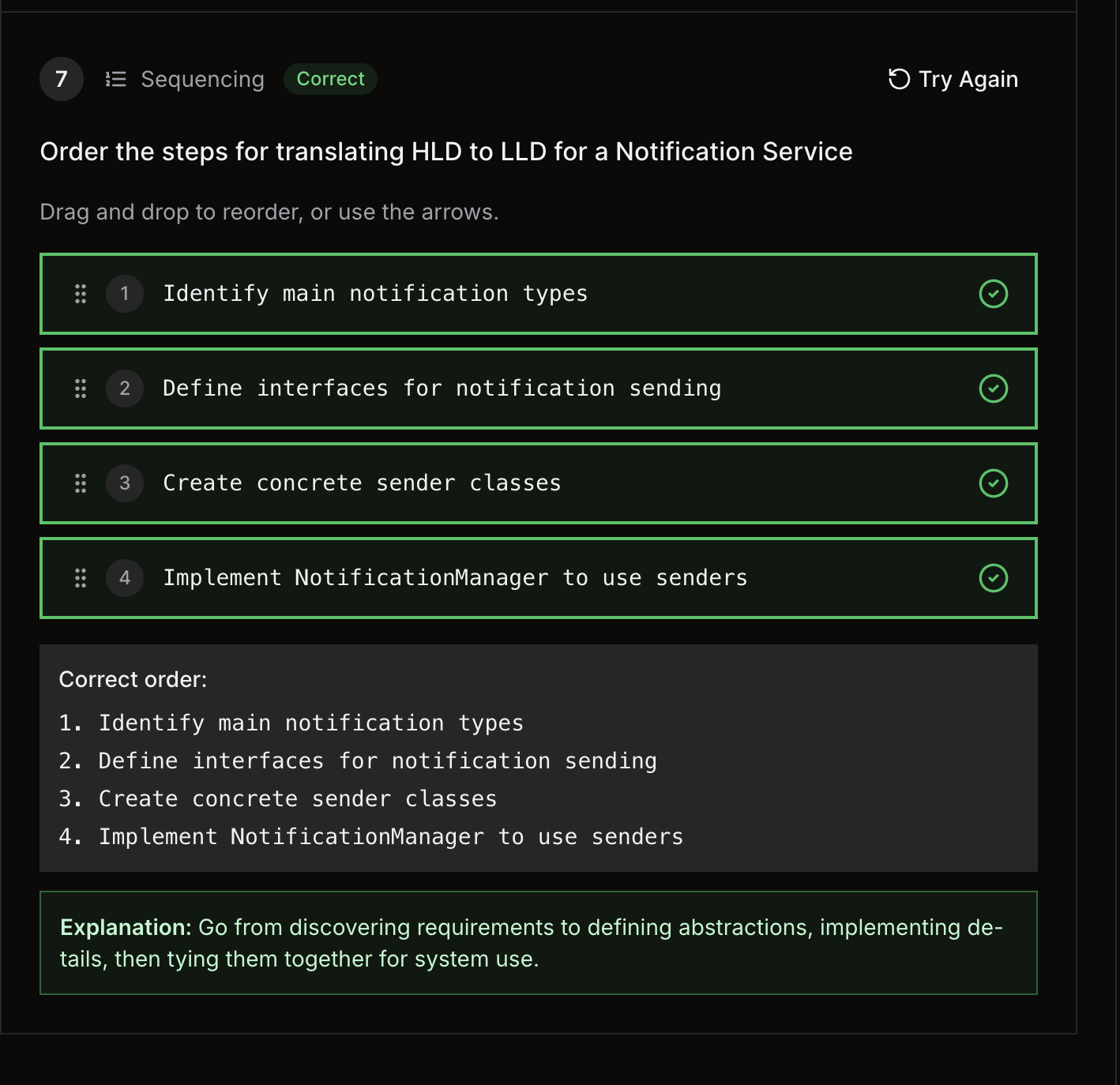
-
Define entities như thế nào ?
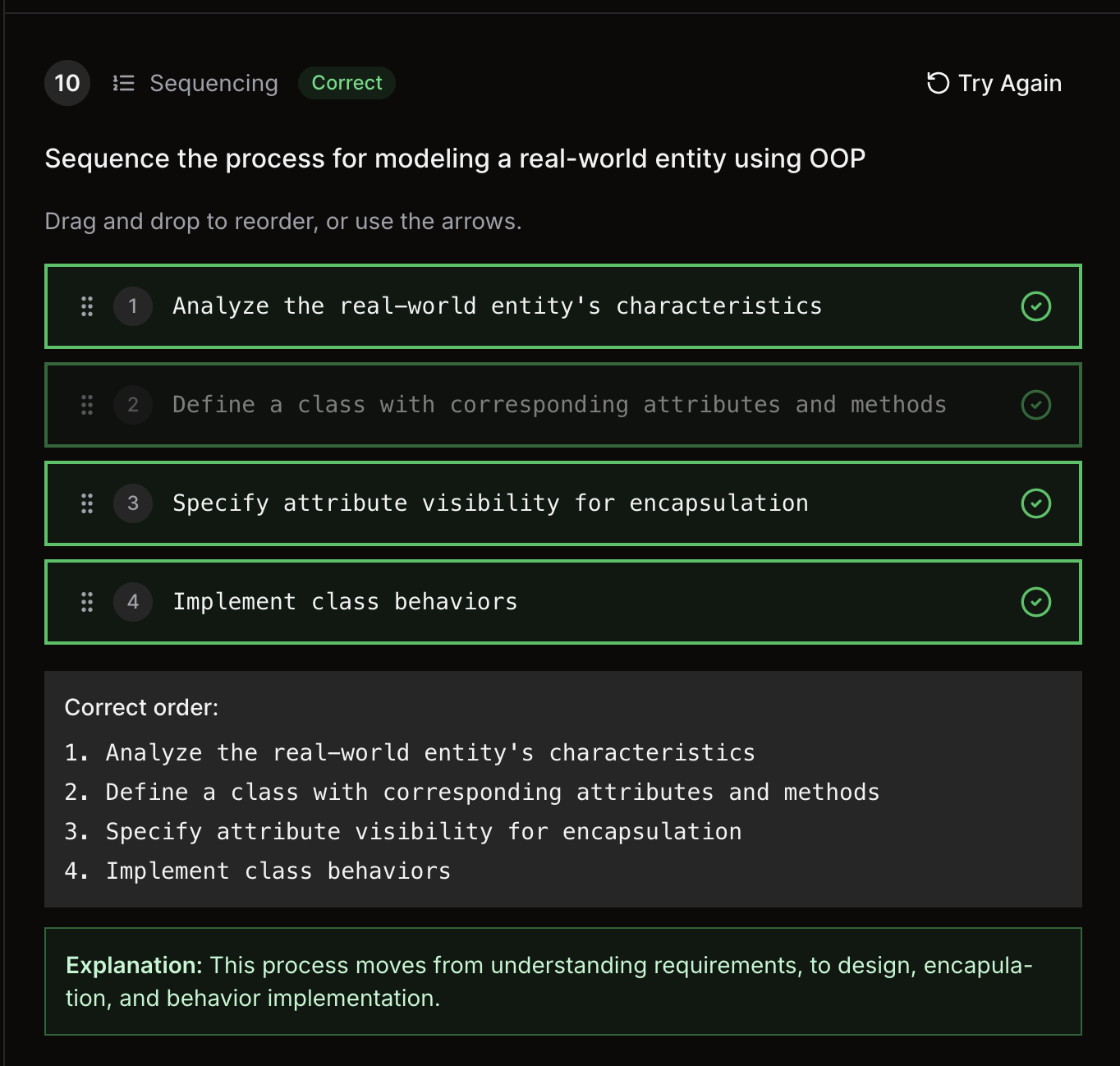
-
Class Design
-
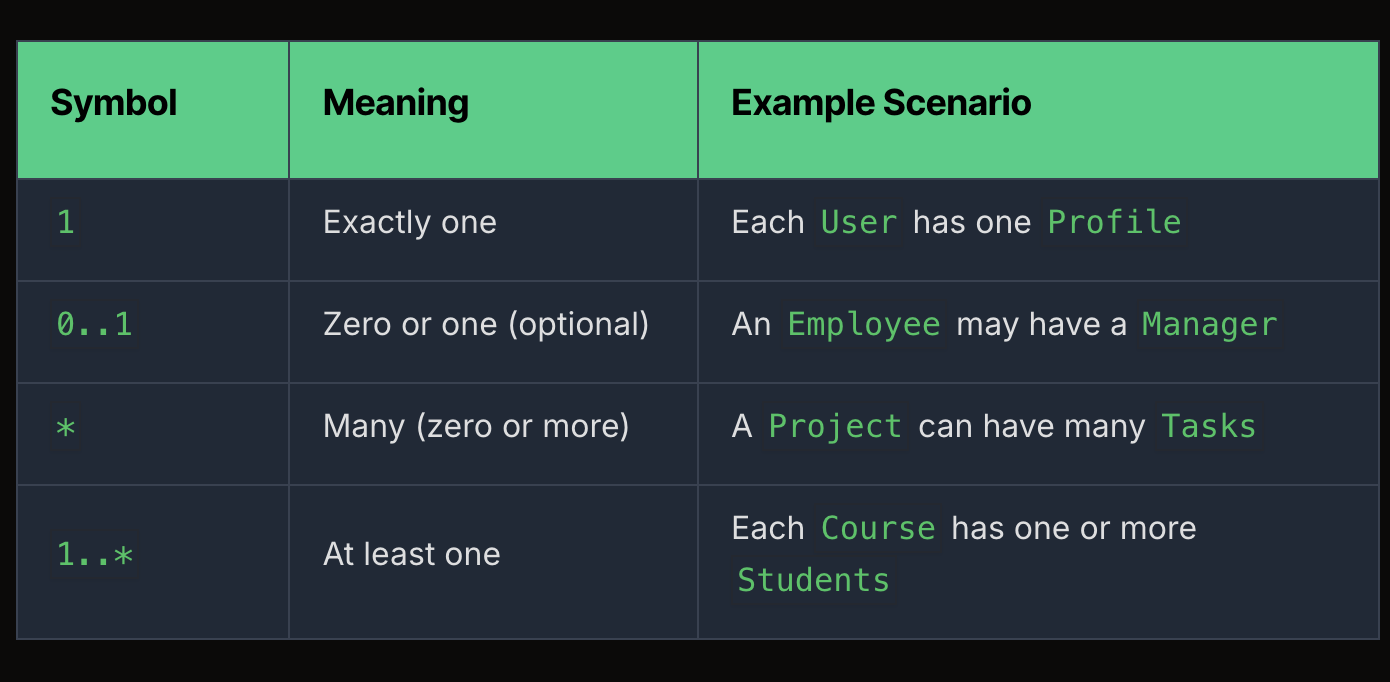
Association
-
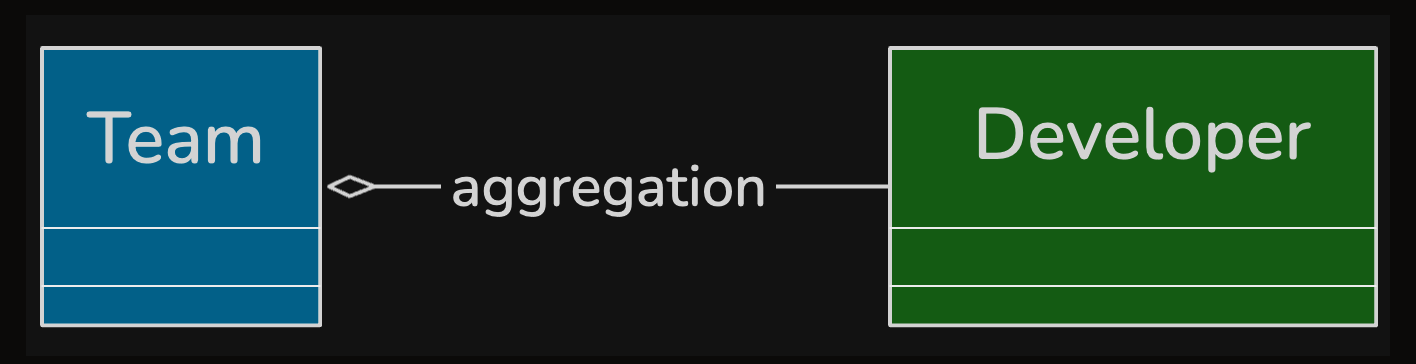
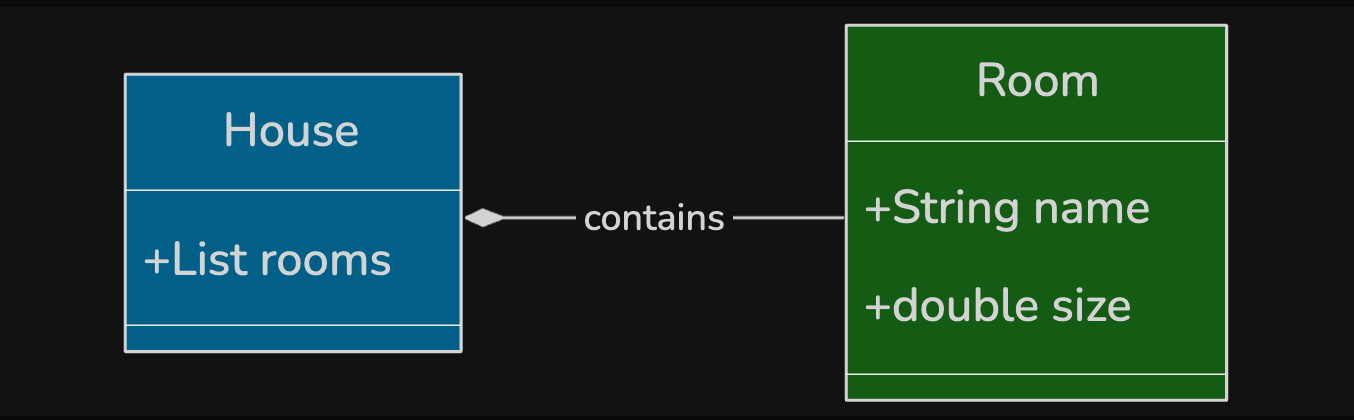
Aggregation - Belong to, Composition - Bao gồm
-
Dependency
- Liên quan bao gồm.
-
- Design Principle
- Don’t repeat yourself.
- Keep it simple
- You Aren’t Gonna Need It.
- Law of Demeter - Push the responsibility to the class know the most.
- Separation of concerns - Split to mulitple layers.
- High Cohesion (độc lập) - Low Coupling (ít depend)
- Use interface in class to decouping
- SOLID principles
- S: module 1 trách nhiệm
- O: thêm code chứ không sửa
- L: thằng con overwrite vào phải implement tất cả method của thằng cha.
- I: Interface nhiều quá thì tách nhiều interface
- D: Dependency inversion thay vì dùng New → New → chaining.
-
Low-level Design
-
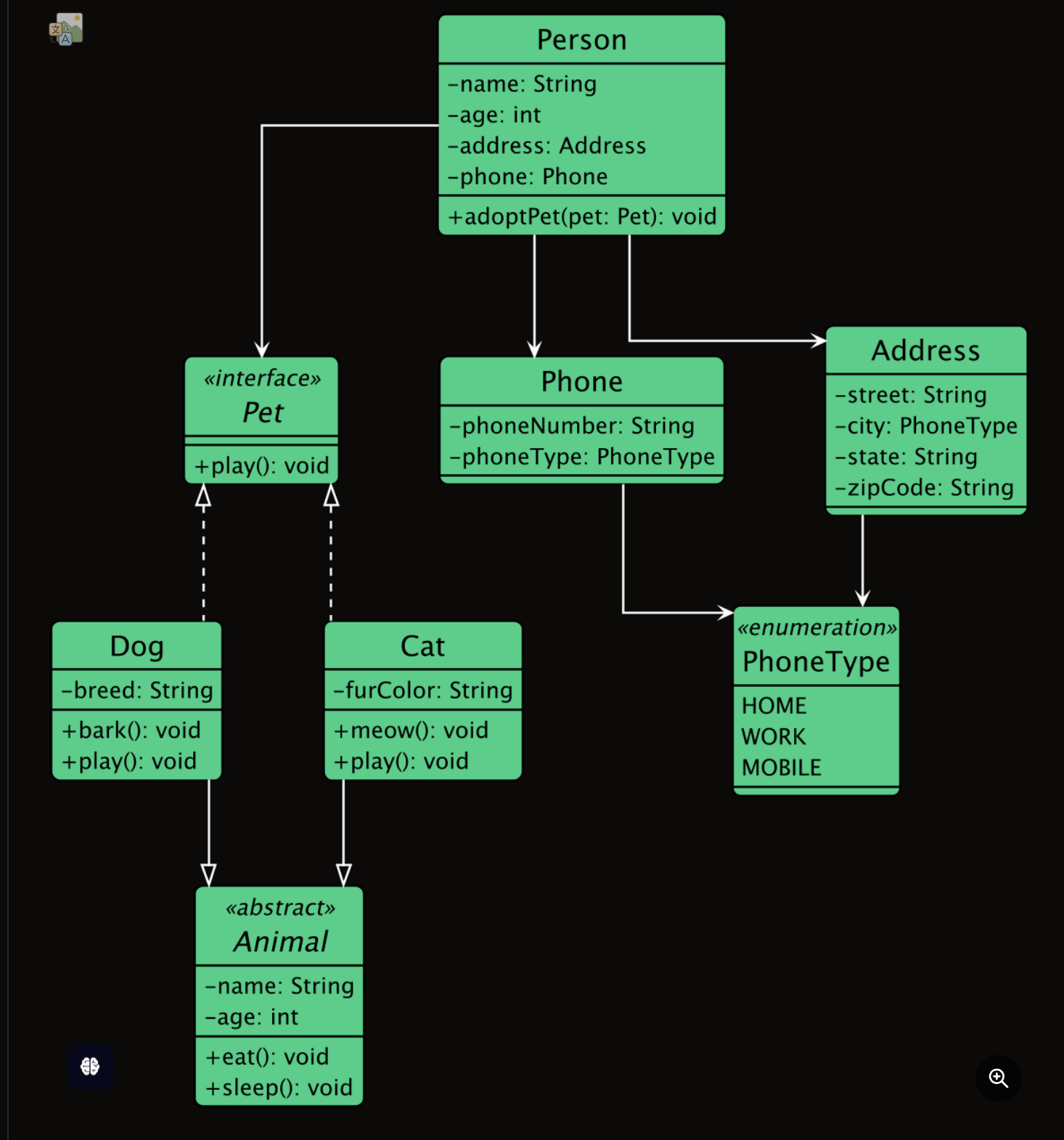
Class Diagram
-
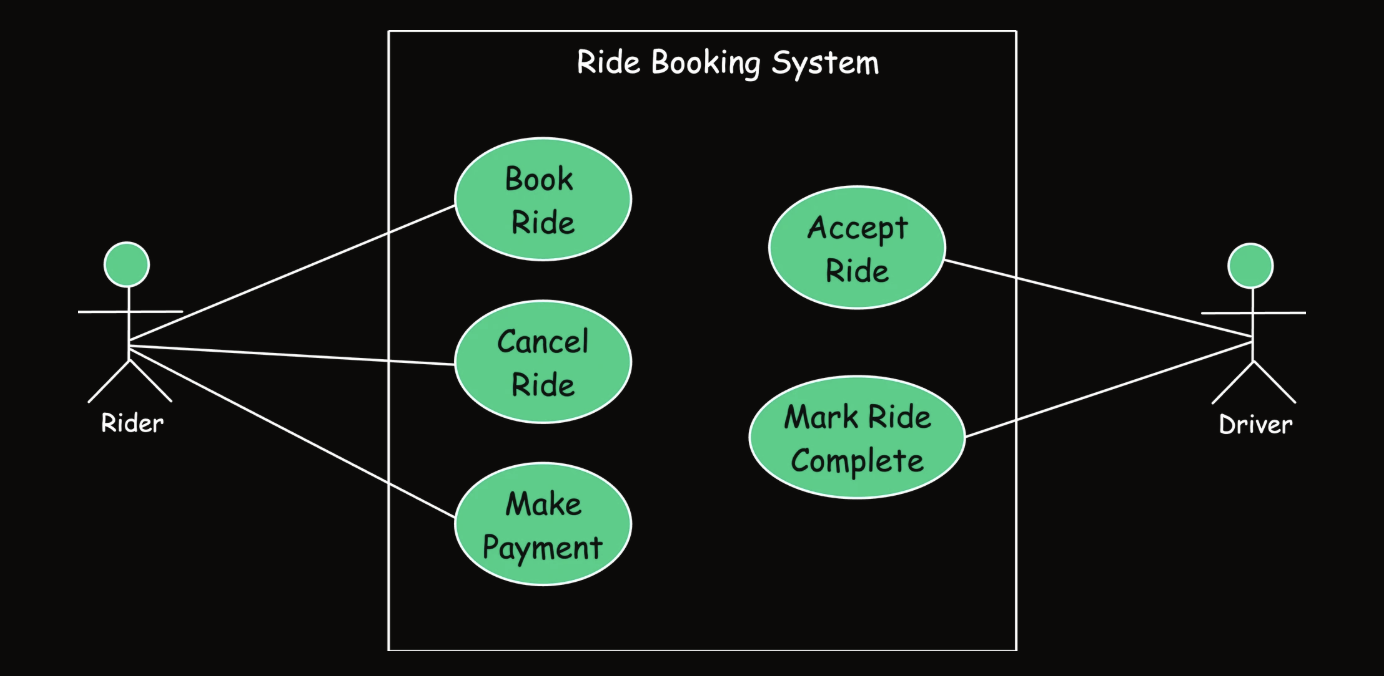
Use Case Diagram
-
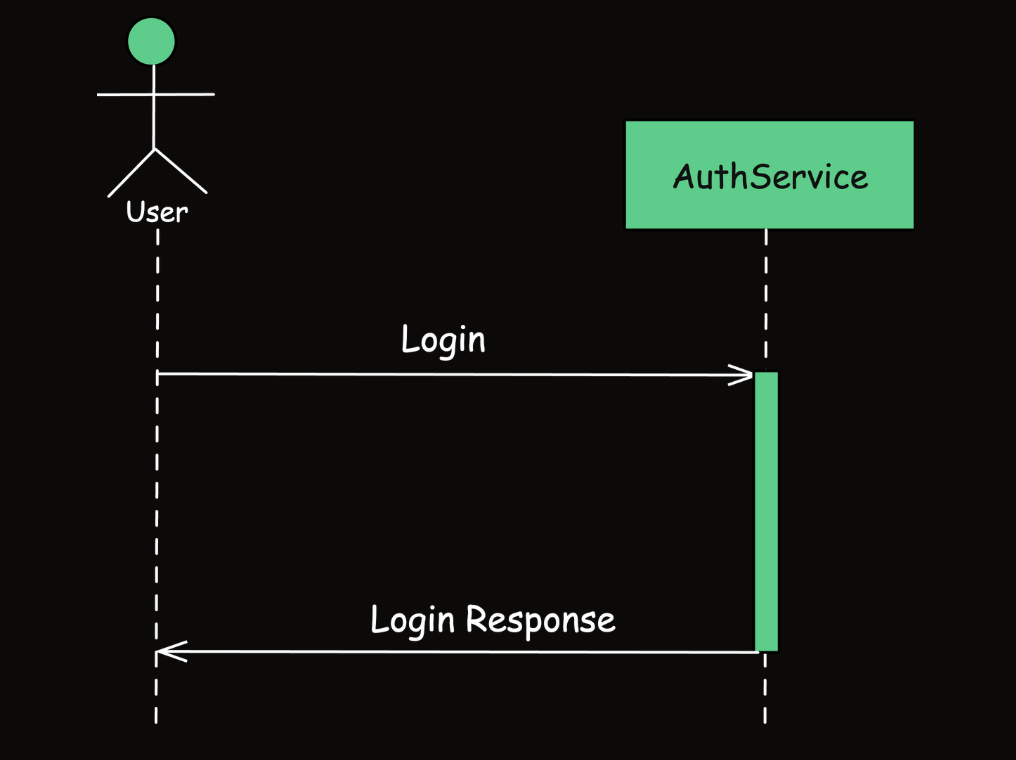
Sequence Diagram
-
-
Design Patterns
-
Creational Pattern
1. Singleton:
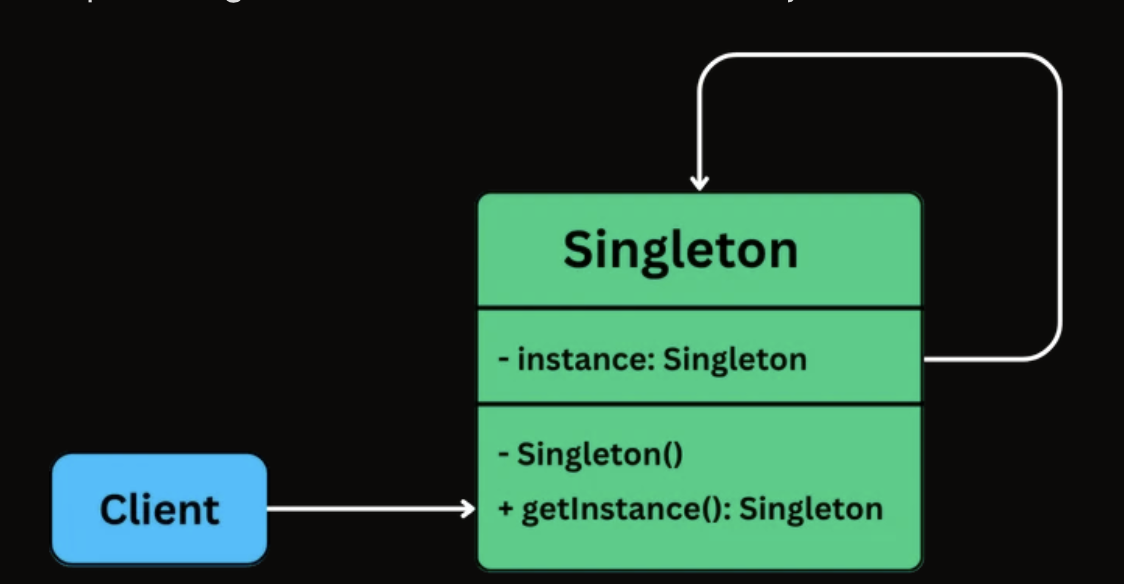
-
Factory Method
class SimpleNotificationFactory { static createNotification(type: string): Notification { switch (type) { case 'EMAIL': return new EmailNotification(); case 'SMS': return new SMSNotification(); case 'PUSH': return new PushNotification(); default: throw new Error('Unknown type'); } } } -
Abstract Factory
class WindowsFactory implements GUIFactory {
  createButton(): Button {
    return new WindowsButton();
  }

  createCheckbox(): Checkbox {
    return new WindowsCheckbox();
  }
}
class WindowsCheckbox implements Checkbox { paint(): void { console.log('Painting a Windows-style checkbox.'); } onSelect(): void { console.log('Windows checkbox selected.'); } }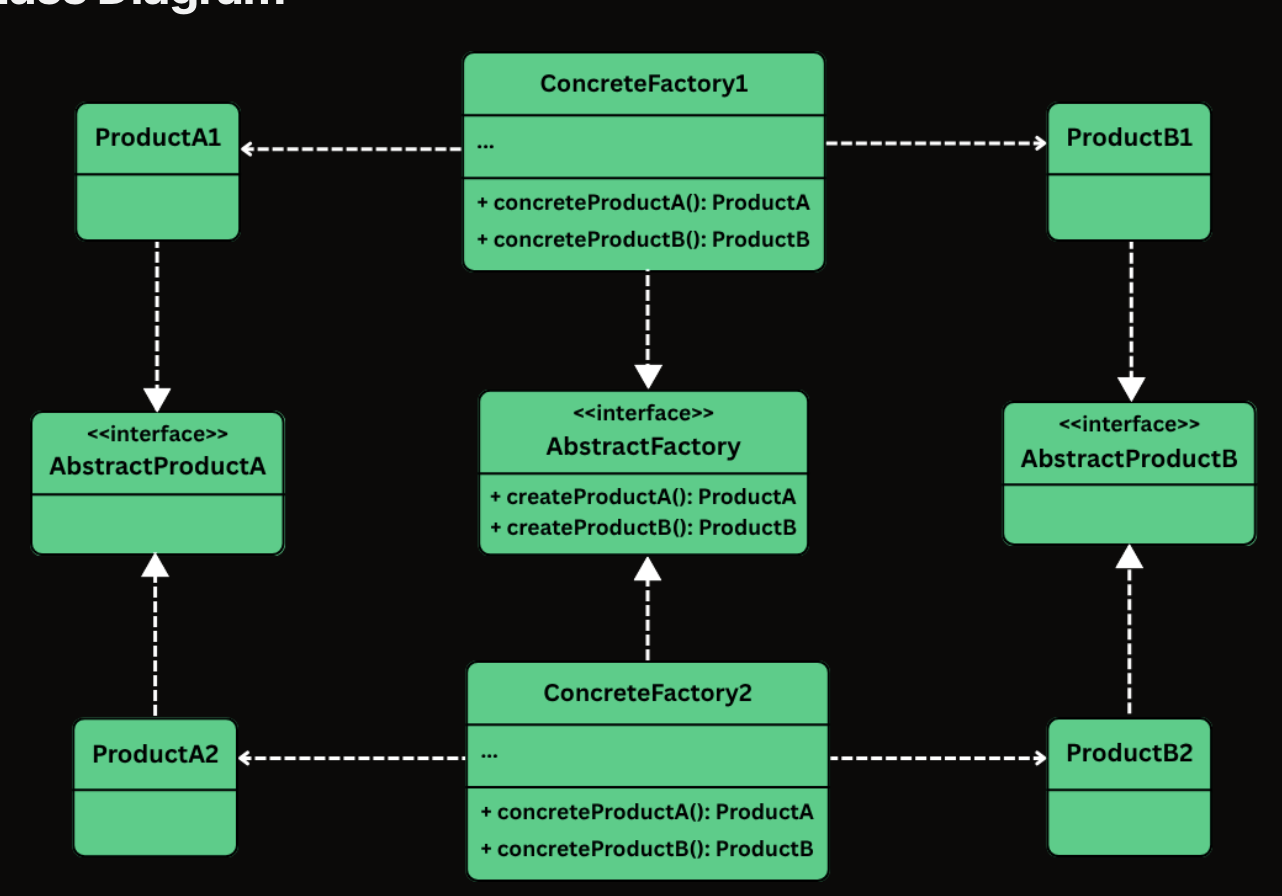
-
Builder Design Pattern
class HttpAppBuilderPattern { static main(): void { const request1 = new HttpRequest.Builder( 'https://api.example.com/data' ).build(); const request2 = new HttpRequest.Builder( 'https://api.example.com/submit' ) .setMethod('POST') .setBody('{"key":"value"}') .setTimeout(15000) .build(); const request3 = new HttpRequest.Builder( 'https://api.example.com/config' ) .setMethod('PUT') .addHeader('X-API-Key', 'secret') .addQueryParam('env', 'prod') .setBody('config_payload') .setTimeout(5000) .build(); console.log(request1.toString()); console.log(request2.toString()); console.log(request3.toString()); } } HttpAppBuilderPattern.main(); -
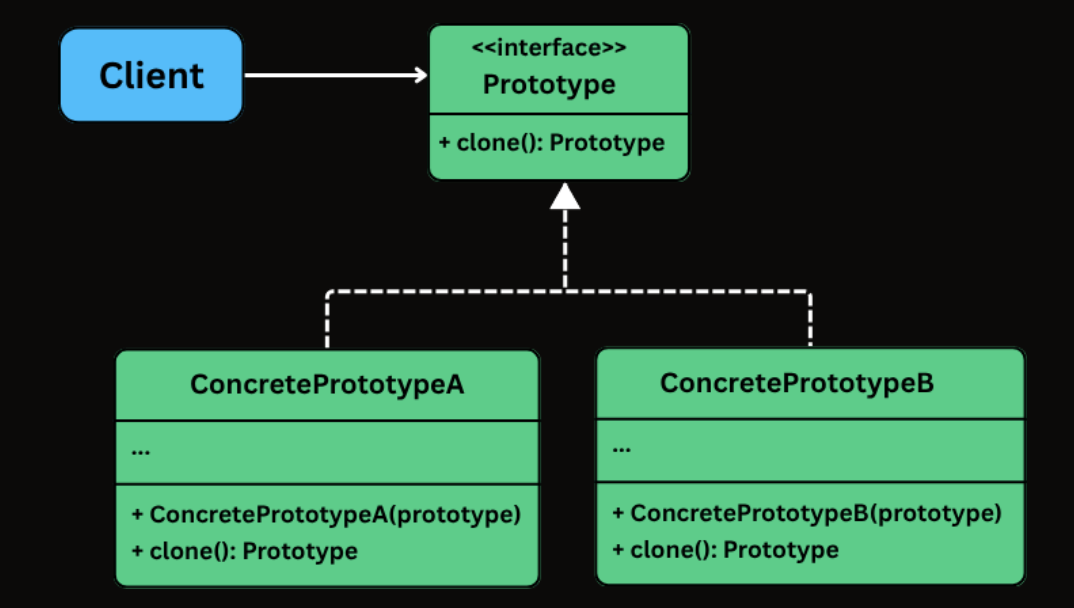
Prototype
Enemy flying1 = new Enemy("Flying", 100, 10.5, false, "Laser");
Enemy flying2 = new Enemy("Flying", 100, 10.5, false, "Laser");

interface EnemyPrototype {
    EnemyPrototype clone();
}
-
-
Structural
1. Adapter: dùng để gắn vào một cái legacy system
- Wrap this to match the suitable interface
// Legacy gateway through adapter System.out.println("\n--- Using Legacy Gateway via Adapter ---"); LegacyGateway legacy = new LegacyGateway(); processor = new LegacyGatewayAdapter(legacy); CheckoutService legacyCheckout = new CheckoutService(processor); legacyCheckout.checkout(75.50, "USD");-
Facade: Centralize the interface
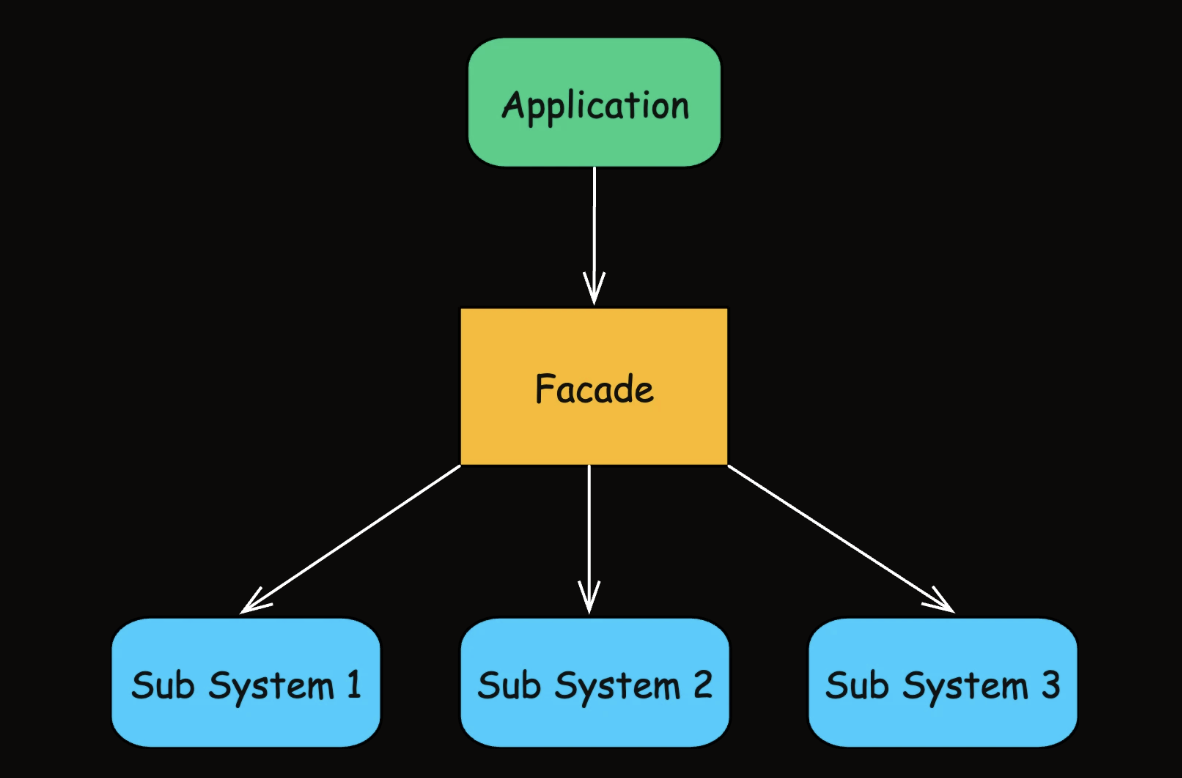
class DeploymentAppFacade { static main(): void { const deploymentFacade = new DeploymentFacade(); // Deploy to production deploymentFacade.deployApplication( 'main', 'prod.server.example.com' ); // Deploy a feature branch to staging console.log('\n--- Deploying feature branch to staging ---'); deploymentFacade.deployApplication( 'feature/new-ui', 'staging.server.example.com' ); } } -
Decoration: extend thêm feature cho 1 class
class BoldDecorator extends TextDecorator {
    public BoldDecorator(TextView inner) {
        super(inner);
    }

    @Override
    public void render() {
        System.out.print("<b>");
        inner.render();
        System.out.print("</b>");
    }
}
class TextRendererApp { static main(): void { const text: TextView = new PlainTextView('Hello, World!'); process.stdout.write('Plain: '); text.render(); console.log(); process.stdout.write('Bold: '); const boldText: TextView = new BoldDecorator(text); boldText.render(); console.log(); process.stdout.write('Italic + Underline: '); const italicUnderline: TextView = new UnderlineDecorator( new ItalicDecorator(text) ); italicUnderline.render(); console.log(); process.stdout.write('Bold + Italic + Underline: '); const allStyles: TextView = new UnderlineDecorator( new ItalicDecorator(new BoldDecorator(text)) ); allStyles.render(); console.log(); } } -
Composite: recursion in recursion, for example: each folder have sub-folder and each files.
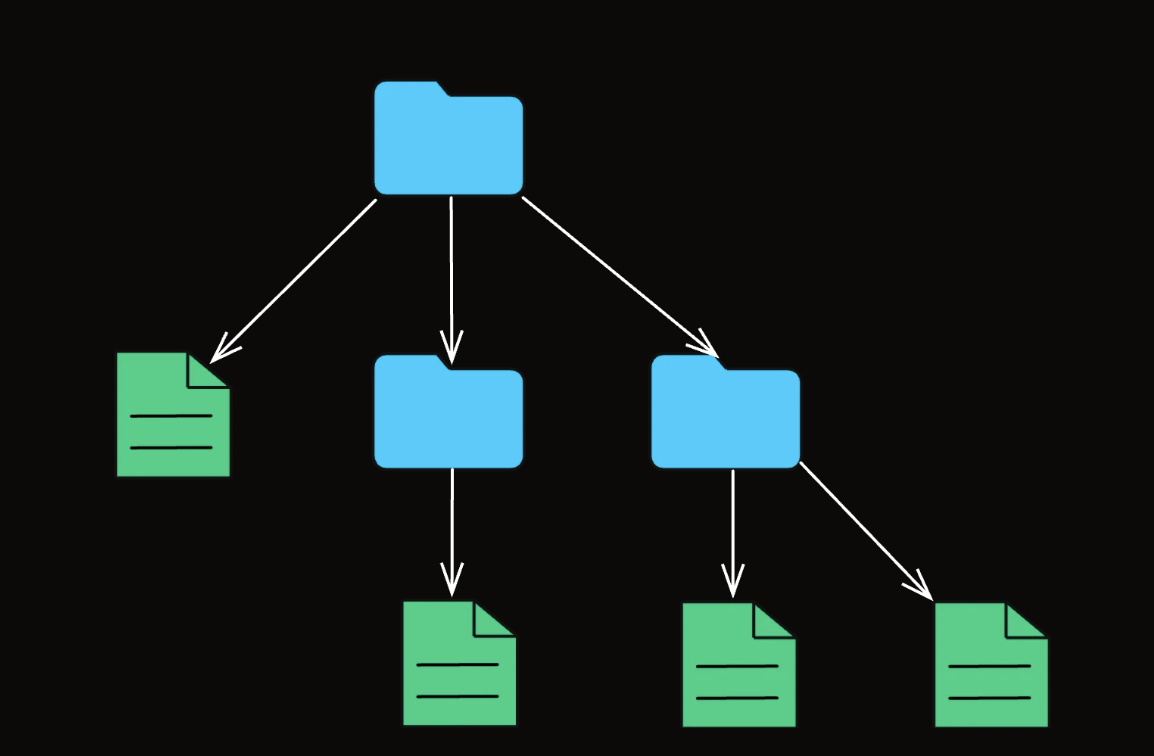
class FileExplorerApp { static main(): void { const file1: FileSystemItem = new File("readme.txt", 5); const file2: FileSystemItem = new File("photo.jpg", 1500); const file3: FileSystemItem = new File("data.csv", 300); const documents = new Folder("Documents"); documents.addItem(file1); documents.addItem(file3); const pictures = new Folder("Pictures"); pictures.addItem(file2); const home = new Folder("Home"); home.addItem(documents); home.addItem(pictures); console.log("---- File Structure ----"); home.printStructure(""); console.log("\nTotal Size: " + home.getSize() + " KB"); console.log("\n---- Deleting All ----"); home.delete(); } } ---- File Structure ---- + Home/ + Documents/ - readme.txt (5 KB) - data.csv (300 KB) + Pictures/ - photo.jpg (1500 KB) Total Size: 1805 KB -
Proxy: trung gian

class ImageGalleryAppV2 { static main(): void { console.log( 'Application Started. Initializing image proxies for gallery...' ); // Create lightweight proxies instead of full image objects const image1: Image = new ImageProxy('photo1.jpg'); const image2: Image = new ImageProxy('photo2.png'); // Never displayed const image3: Image = new ImageProxy('photo3.gif'); console.log( '\nGallery initialized. No images actually loaded yet.' ); console.log('Image 1 Filename: ' + image1.getFileName()); // Does not trigger image load // User clicks on image1 console.log('\nUser requests to display ' + image1.getFileName()); image1.display(); // Lazy loading happens here // User clicks on image1 again console.log( '\nUser requests to display ' + image1.getFileName() + ' again.' ); image1.display(); // Already loaded; no loading delay // User clicks on image3 console.log('\nUser requests to display ' + image3.getFileName()); image3.display(); // Triggers loading for image3 console.log( '\nApplication finished. Note: photo2.png was never loaded.' ); } } -
Bridge: viết lại 1 cái abstraction khác để integrate
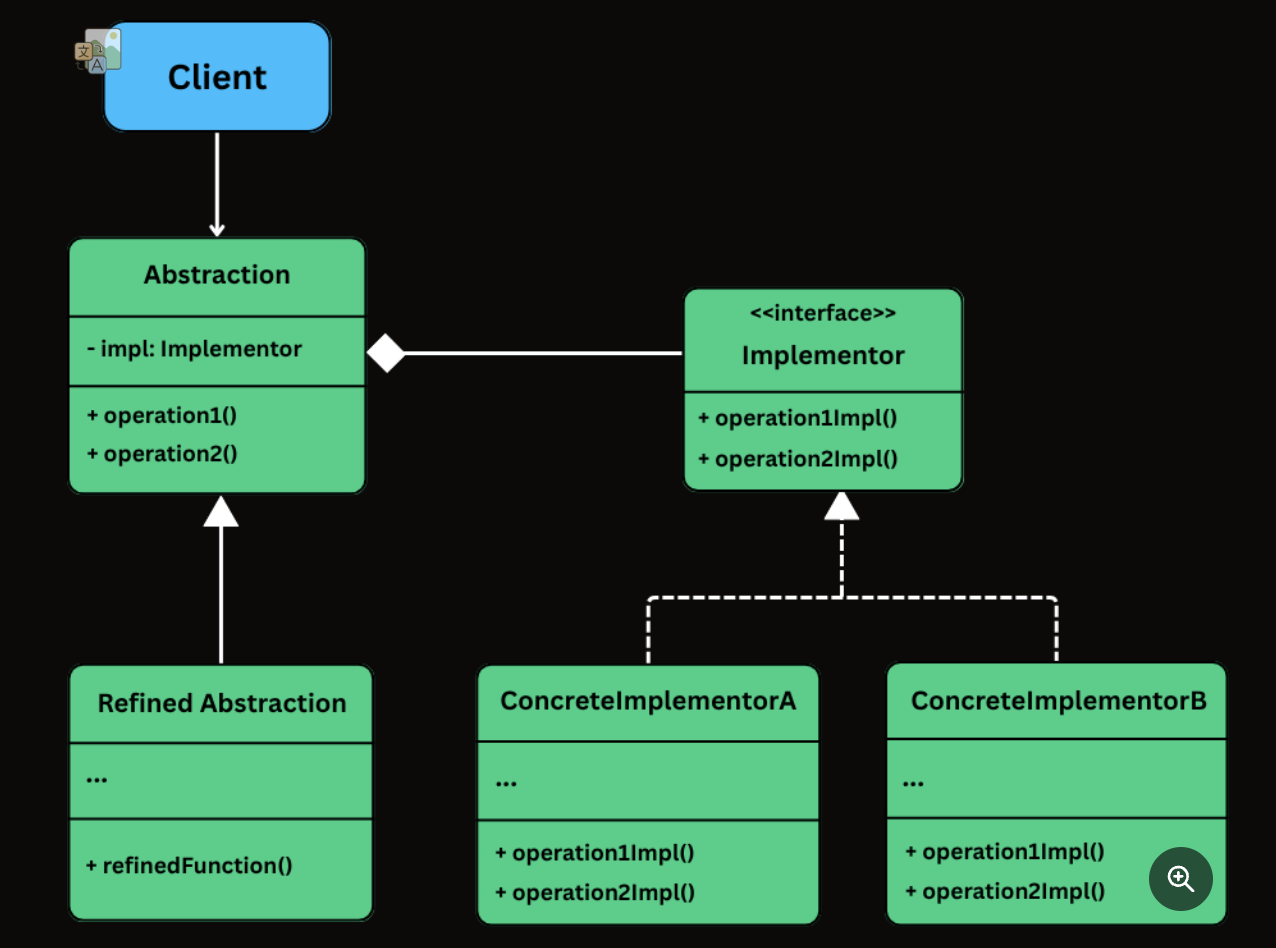
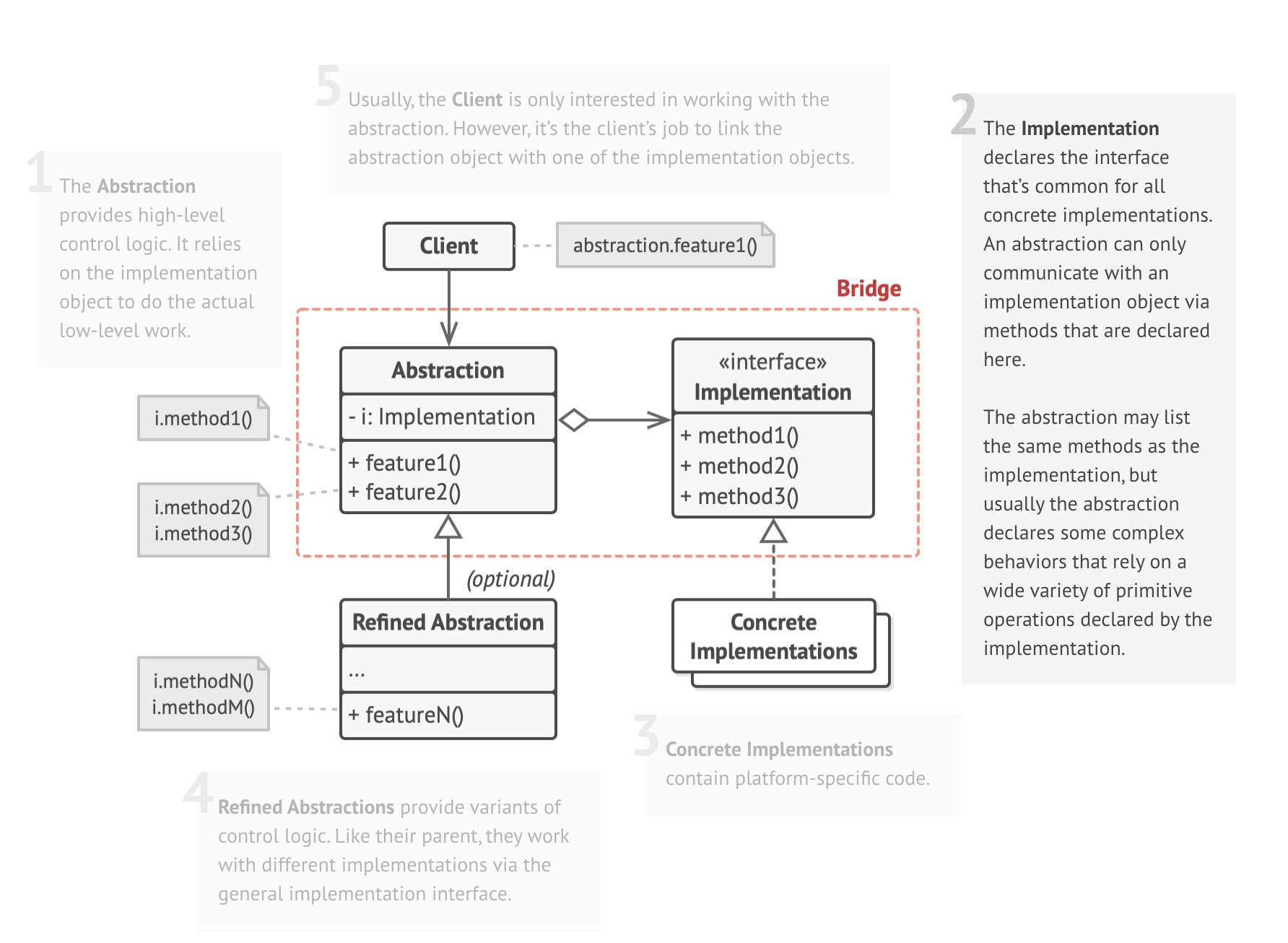
class BridgeDemo { static main(): void { const vector: Renderer = new VectorRenderer(); const raster: Renderer = new RasterRenderer(); const circle1: Shape = new Circle(vector, 5); const circle2: Shape = new Circle(raster, 5); const rectangle1: Shape = new Rectangle(vector, 10, 4); const rectangle2: Shape = new Rectangle(raster, 10, 4); circle1.draw(); // Vector circle2.draw(); // Raster rectangle1.draw(); // Vector rectangle2.draw(); // Raster } } -
Flyweight: Split nhỏ và share mấy cái chung as much as possible.
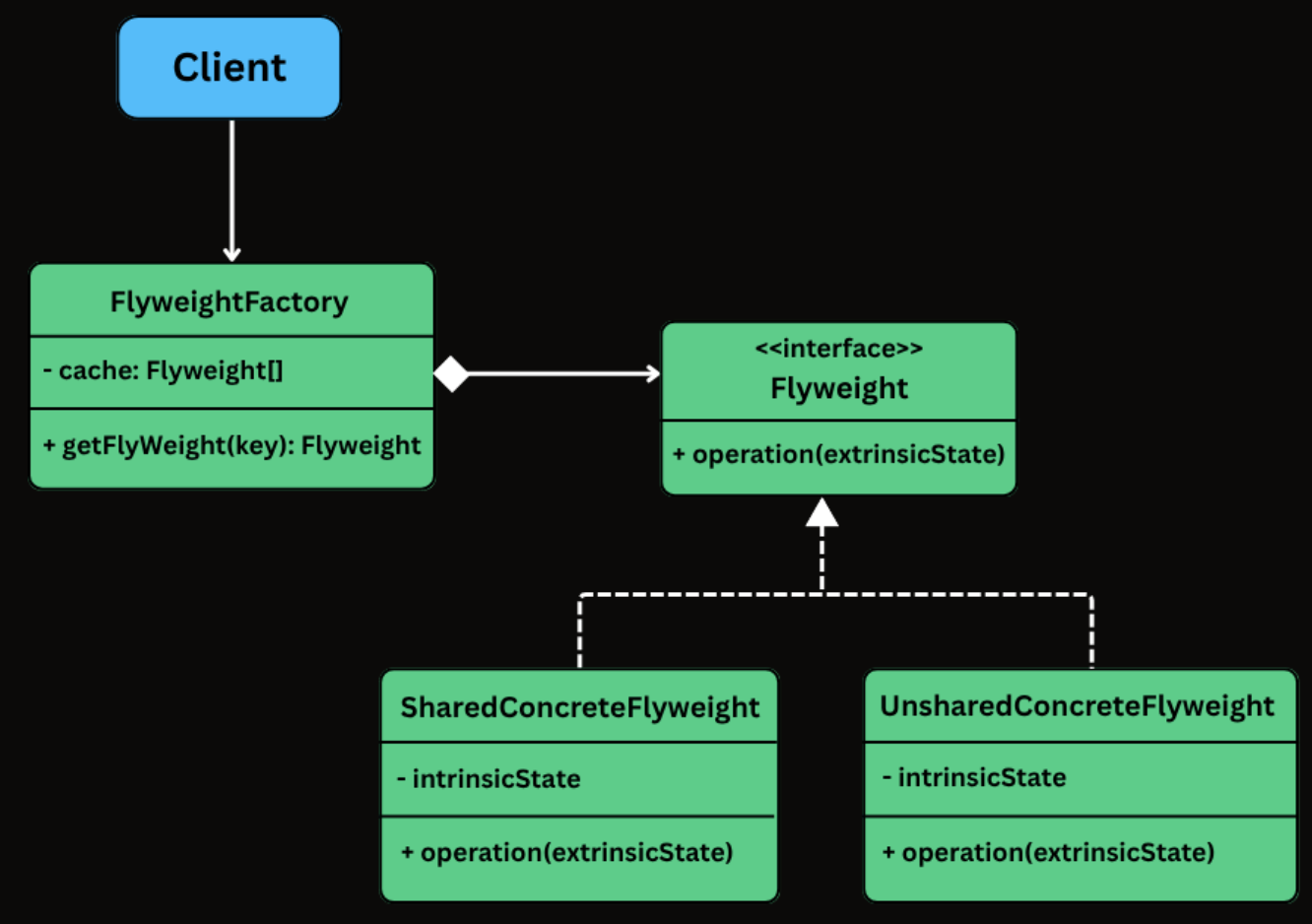
class FlyweightDemo {
  static main(): void {
    const editor = new TextEditorClient();

    // Render "Hello" with same style
    const word = 'Hello';
    for (let i = 0; i < word.length; i++) {
      editor.addCharacter(
        word.charAt(i),
        10 + i * 15,
        50,
        'Arial',
        14,
        '#000000'
      );
    }

    // Render "World" with different font and color
    const word2 = 'World';
    for (let i = 0; i < word2.length; i++) {
      editor.addCharacter(
        word2.charAt(i),
        10 + i * 15,
        100,
        'Times New Roman',
        14,
        '#3333FF'
      );
    }

    editor.renderDocument();
  }
}
-
Behavioral
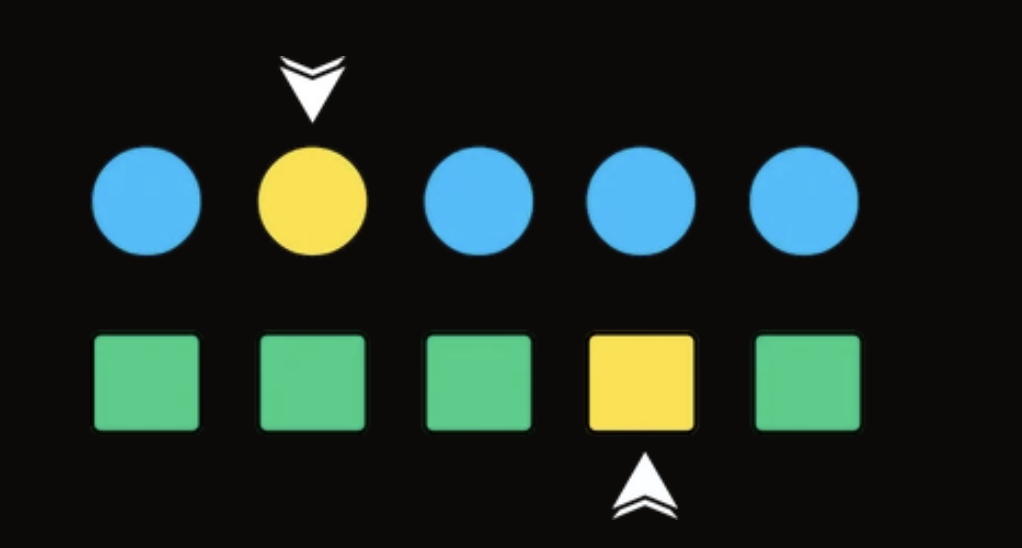
- Iterator Design: Loop through the data structure
interface Iterator<T> {
  hasNext(): boolean;
  next(): T;
}

class MusicPlayer {
  static main(): void {
    const playlist = new Playlist();
    playlist.addSong('Shape of You');
    playlist.addSong('Bohemian Rhapsody');
    playlist.addSong('Blinding Lights');

    const iterator: Iterator<string> = playlist.createIterator();

    console.log('Now Playing:');
    while (iterator.hasNext()) {
      console.log(' 🎵 ' + iterator.next());
    }
  }
}
- Observer Pattern: Pub/Sub state machine.
class FitnessAppObserverDemo { static main(): void { const fitnessData = new FitnessData(); const display = new LiveActivityDisplay(); const logger = new ProgressLogger(); const notifier = new GoalNotifier(); // Register observers fitnessData.registerObserver(display); fitnessData.registerObserver(logger); fitnessData.registerObserver(notifier); // Simulate updates fitnessData.newFitnessDataPushed(500, 5, 20); fitnessData.newFitnessDataPushed(9800, 85, 350); fitnessData.newFitnessDataPushed(10100, 90, 380); // Goal should trigger // Daily reset notifier.reset(); fitnessData.dailyReset(); } }-
Strategy Design Pattern: Parking strategy
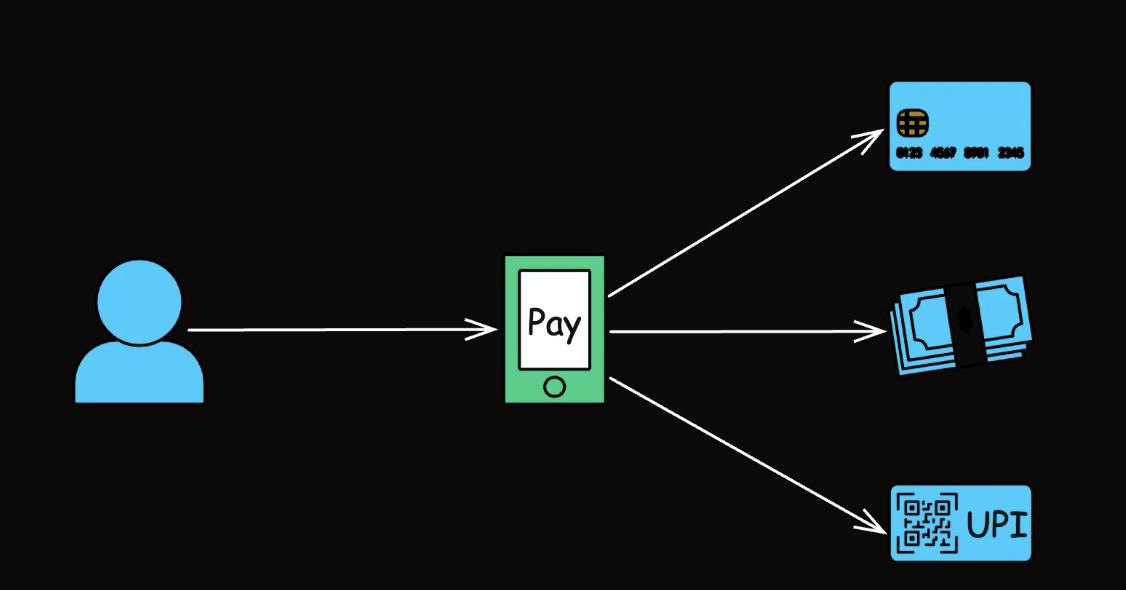
class ECommerceAppV2 {
  static main(): void {
    const order1 = new Order();

    // Create different strategy instances
    const flatRate: ShippingStrategy = new FlatRateShipping(10.0);
    const weightBased: ShippingStrategy = new WeightBasedShipping(2.5);
    const distanceBased: ShippingStrategy = new DistanceBasedShipping(
      5.0
    );
    const thirdParty: ShippingStrategy = new ThirdPartyApiShipping(
      7.5,
      0.02
    );

    // Create context with an initial strategy
    const shippingService = new ShippingCostService(flatRate);

    console.log('--- Order 1: Using Flat Rate (initial) ---');
    shippingService.calculateShippingCost(order1);

    console.log('\n--- Order 1: Changing to Weight-Based ---');
    shippingService.setStrategy(weightBased);
    shippingService.calculateShippingCost(order1);

    console.log('\n--- Order 1: Changing to Distance-Based ---');
    shippingService.setStrategy(distanceBased);
    shippingService.calculateShippingCost(order1);

    console.log('\n--- Order 1: Changing to Third-Party API ---');
    shippingService.setStrategy(thirdParty);
    shippingService.calculateShippingCost(order1);

    // Adding a NEW strategy is easy:
    // 1. Create a new class implementing ShippingStrategy (e.g., FreeShippingStrategy)
    // 2. Client can then instantiate and use it:
    //    const freeShipping: ShippingStrategy = new FreeShippingStrategy();
    //    shippingService.setStrategy(freeShipping);
    //    shippingService.calculateShippingCost(primeMemberOrder);
    // No modification to ShippingCostService is needed!
  }
}
-
-
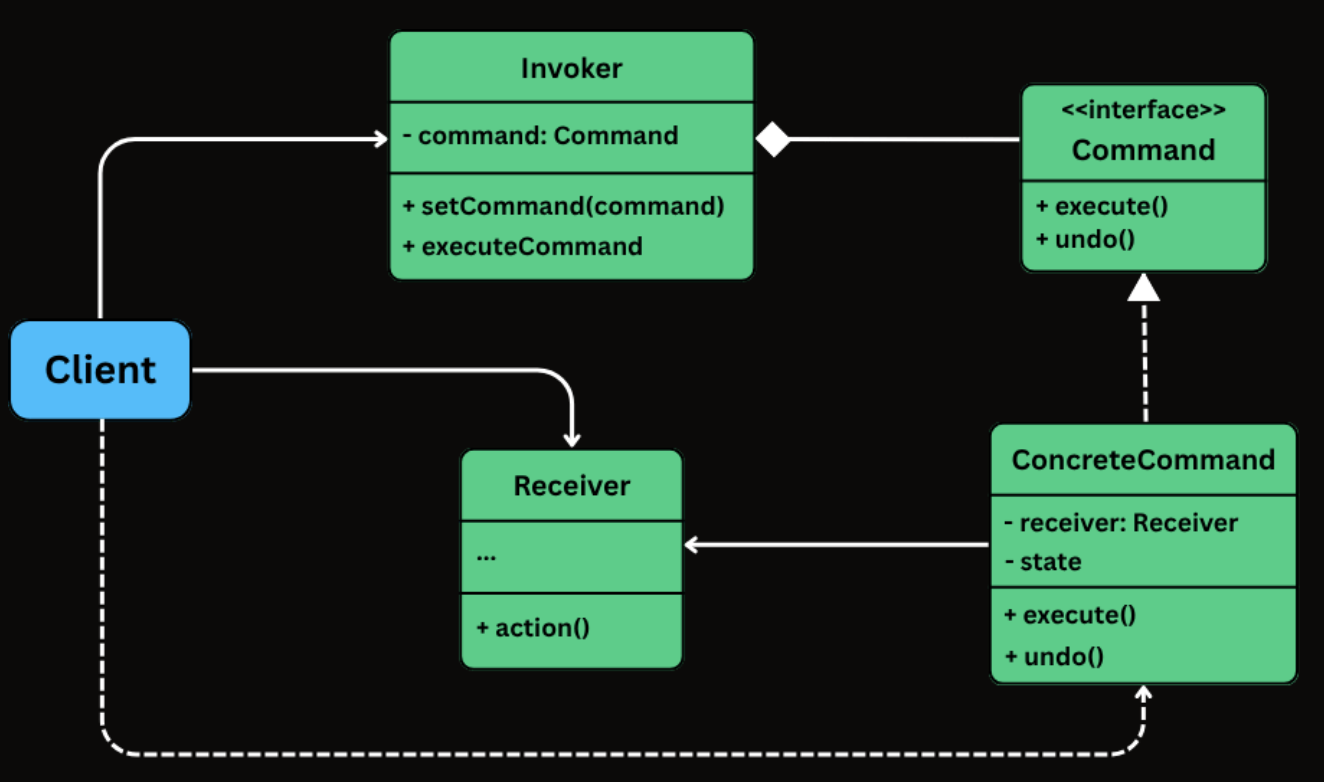
Command Pattern: IoT Project

interface Command { execute(): void; undo(): void; } class LightOnCommand implements Command { private readonly light: Light; constructor(light: Light) { this.light = light; } execute(): void { this.light.on(); } undo(): void { this.light.off(); } } class SmartHomeApp { static main(): void { // Receivers const light = new Light(); const thermostat = new Thermostat(); // Commands const lightOn: Command = new LightOnCommand(light); const lightOff: Command = new LightOffCommand(light); const setTemp22: Command = new SetTemperatureCommand(thermostat, 22); // Invoker const button = new SmartButton(); // Simulate usage console.log("→ Pressing Light ON"); button.setCommand(lightOn); button.press(); console.log("→ Pressing Set Temp to 22°C"); button.setCommand(setTemp22); button.press(); console.log("→ Pressing Light OFF"); button.setCommand(lightOff); button.press(); // Undo sequence console.log("\n↶ Undo Last Action"); button.undoLast(); // undo Light OFF console.log("↶ Undo Previous Action"); button.undoLast(); // undo Set Temp console.log("↶ Undo Again"); button.undoLast(); // undo Light ON } } -
State Pattern: multiple state machine

```jsx class IdleState implements MachineState { selectItem(context: VendingMachine, itemCode: string): void { console.log(“Item selected: “ + itemCode); context.setSelectedItem(itemCode); context.setState(new ItemSelectedState()); }
insertCoin(context: VendingMachine, amount: number): void { console.log(“Please select an item before inserting coins.”); }
dispenseItem(context: VendingMachine): void { console.log(“No item selected. Nothing to dispense.”); } }
class ItemSelectedState implements MachineState { selectItem(context: VendingMachine, itemCode: string): void { console.log(“Item already selected: “ + context.getSelectedItem()); }
  insertCoin(context: VendingMachine, amount: number): void {
      console.log("Inserted $" + amount + " for item: " + context.getSelectedItem());
      context.setInsertedAmount(amount);
      context.setState(new HasMoneyState());
  }

  dispenseItem(context: VendingMachine): void {
      console.log("Insert coin before dispensing.");
  }    }    ```
-
Vendor Machine: current state to change this.
class VendingMachine {
   private currentState: MachineState;
   private selectedItem: string;
   private insertedAmount: number;

   constructor() {
       this.currentState = new IdleState(); // Initial state
   }

   setState(newState: MachineState): void {
       this.currentState = newState;
   }

   setSelectedItem(itemCode: string): void {
       this.selectedItem = itemCode;
   }

   setInsertedAmount(amount: number): void {
       this.insertedAmount = amount;
   }

   getSelectedItem(): string {
       return this.selectedItem;
   }

   selectItem(itemCode: string): void {
       this.currentState.selectItem(this, itemCode);
   }

   insertCoin(amount: number): void {
       this.currentState.insertCoin(this, amount);
   }

   dispenseItem(): void {
       this.currentState.dispenseItem(this);
   }

   reset(): void {
       this.selectedItem = "";
       this.insertedAmount = 0.0;
       this.currentState = new IdleState();
   }
}
-
Template Method: reuse template when expose the file
class CsvReportExporter extends AbstractReportExporter {
   //prepareData() not overridden - default will be used
   //openFile() not overridden - default will be used

   protected writeHeader(data: ReportData): void {
       console.log("CSV: Writing header: " + data.getHeaders().join(","));
   }

   protected writeDataRows(data: ReportData): void {
       console.log("CSV: Writing data rows...");
       for (const row of data.getRows()) {
           console.log("CSV: " + Array.from(row.values()));
       }
   }

   // writeFooter() not overridden - default will be used
   // closeFile() not overridden - default will be used
}
class PdfReportExporter extends AbstractReportExporter { //prepareData() not overridden - default will be used //openFile() not overridden - default will be used protected writeHeader(data: ReportData): void { console.log("PDF: Writing header: " + data.getHeaders().join(",")); } protected writeDataRows(data: ReportData): void { console.log("PDF: Writing data rows..."); for (const row of data.getRows()) { console.log("PDF: " + Array.from(row.values())); } } // writeFooter() not overridden - default will be used // closeFile() not overridden - default will be used } -
Visitor Pattern: The Visitor Design Pattern is a behavioral pattern that enables the addition of new operations to existing object structures without modifying their classes.
class VisitorPatternDemo { static main(): void { const shapes: Shape[] = [ new Circle(5), new Rectangle(10, 4), new Circle(2.5), ]; console.log('=== Calculating Areas ==='); const areaCalculator: ShapeVisitor = new AreaCalculatorVisitor(); for (const shape of shapes) { shape.accept(areaCalculator); } console.log('\n=== Exporting to SVG ==='); const svgExporter: ShapeVisitor = new SvgExporterVisitor(); for (const shape of shapes) { shape.accept(svgExporter); } } } -
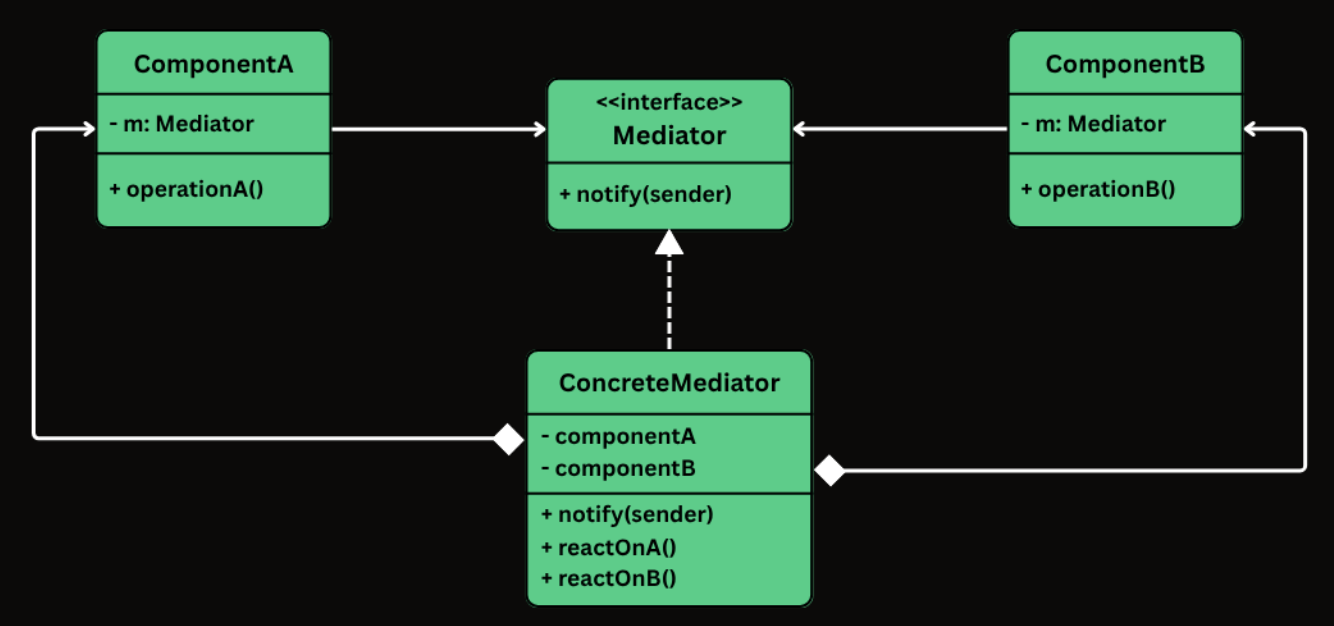
Mediator Pattern: defines an object (the Mediator) to encapsulate how a set of objects interact.
-
Memento: capture and store an object’s internal state so it can be restored later.

class TextEditorUndoV2 { static main(): void { const editor = new TextEditor(); const undoManager = new TextEditorUndoManager(); editor.type('Hello'); undoManager.save(editor); // save state: Hello editor.type(' World'); undoManager.save(editor); // save state: Hello World editor.type('!'); console.log('Current Content: ' + editor.getContent()); // Hello World! console.log('\n--- Undo 1 ---'); undoManager.undo(editor); // Back to: Hello World console.log('\n--- Undo 2 ---'); undoManager.undo(editor); // Back to: Hello console.log('\n--- Undo 3 ---'); undoManager.undo(editor); // Nothing left to undo } } -
Chain of Responsibility: change it to along multiple handlers
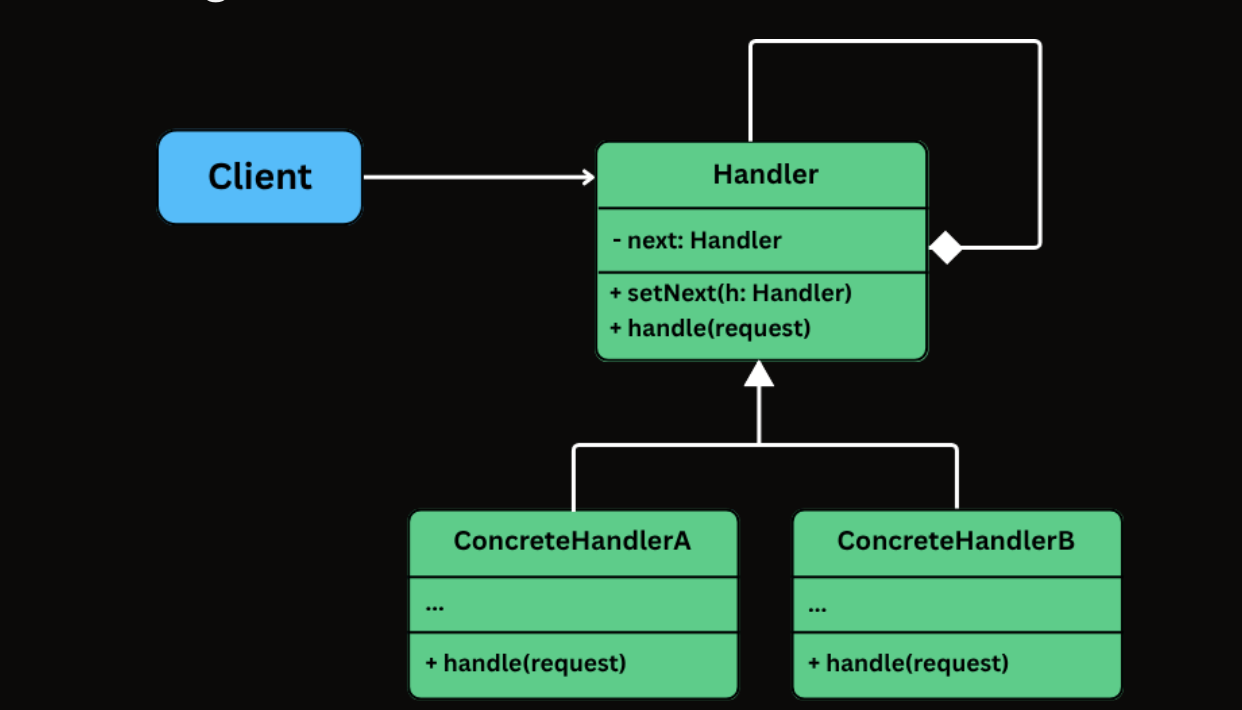
class RequestHandlerApp { static main(): void { // Create handlers const auth: RequestHandler = new AuthHandler(); const authorization: RequestHandler = new AuthorizationHandler(); const rateLimit: RequestHandler = new RateLimitHandler(); const validation: RequestHandler = new ValidationHandler(); const businessLogic: RequestHandler = new BusinessLogicHandler(); // Build the chain auth.setNext(authorization); authorization.setNext(rateLimit); rateLimit.setNext(validation); validation.setNext(businessLogic); // Send a request through the chain const request = new Request( 'john', 'ADMIN', 10, '{ "data": "valid" }' ); auth.handle(request); console.log('\n--- Trying an invalid request ---'); const badRequest = new Request(null, 'USER', 150, ''); auth.handle(badRequest); } } - Some communicaton patterns
- MVC Pattern
- Repository Pattern
- Producer-Consumer Pattern
- Thread Pool pattern.
- How to approach the LLD interview ?
- Design
- Clarify the requirements.
- Choose the entities.
- Define fields for entities.
- Define methods for entities.
- Define central class and relationship functions: use-a, has-a, is-a.
- Implementation
- Follow SOLID, Coding Patterns.
- Follow Design Patterns.
- Handle concurrency.
- Handle edge cases, exceptions.
- How to write a class for function ?
- Clarity: understand the thinking process.
- Intent: have intent when and why to use it.
- Single responsibility: Each class takes 1 responsibility to do.
- How to decide the pattern ?
- Creational Patterns:
- How the object are created using singleton or clone ?
- Structural Pattern:
- How this system is adapt to new larger system ?
- Behavior Pattern:
- How each components interact with others ?
- Creational Patterns:
- Design
- How to implement DSA tốt ?
- High level idea đầu tiên: Ne thế mạnh của mình
- Break thành nhiều phần nhỏ hơn ⇒ implement từng phần: Using Si here.