
Knowledge Base - Patterns - Technologies - Core concepts
Here is some backbone Knowledge Base - Patterns - Technologies - Core concepts for System Design Interview.
1. Patterns
- Dive deep: Using the patterns to understand and dive deep edge cases in System Design.
2. Technologies
- Technical choices: Use to pros/cons when select technology.
3. Core concepts
- Details: API Design, Network, Database Model.
4. Details
API Paradigms
- TCP and UDP
- TCP: mỗi khi gửi packets sẽ đợi ACK để make sure packet đó gửi thành công ⇒ keep order and reliability but high latency.
- UDP: fire and forget
- HTTP
- Built on top TCP, including fields like: Cookies, Method,…
- IP:
- Local IP of nodes is in DHCP server.
- Public IP in the Internet ⇒ NAT Gateway.
- Latency and throughput:
- Throughput CAN affect latency.
- When server is low load, it is the same
- When server is high load ⇒ throughput consume memory in pods ⇒ affect latency.
- HTTP, and API Paradigm: REST (HTTP 1.1), GraphQL (HTTP 1.1), gRPC (HTTP 2), SSE (HTTP 1.1), Websocket (HTTP 1.1):
- HTTP is protocol.
- REST, GraphQL and gRPC, SSE, WebSocket: just API paradiasm.
- REST:
- REST used in basic baseline for API Design.
- Do not well for high-throughput services.
- JSON format can be wasted of memory.
- GraphQL:
- Handle the case for over-fetching and under-fetching in FE.
- We only fetch enough data they need.
- Use when the schema in client-side change mostly ⇒ Optimize the number of API Calls in client-side.
- gRPC
- Use in service communication
- Transfer binary, HTTP 2 ⇒ Low throughput and save memory.
- Encode a JSON cost 40 bytes, but grpc just 15 bytes.
- SSE (Use for server - client)
- gRPC can support streaming, but do not all browsers support gRPC.
- SSE is built over HTTP, still keep connection until the client close the tab or network disruption.
- The connection can be re-connected based on the last message sent.
- Websocket (client-server bidirection)
- gRPC can support streaming, but do not all browsers support gRPC.
- Use when you want server and client communicate togerther.
- WebRTC (client-client)
- Instead of client-server, the client1 request to the cluster management to find the address of client2.
- Client1 and Client2 make a Peer-to-peer connection.
- Redis cluster
- Gossip protocol: Nodes in Redis using Gossip protocol to know the status of another nodes, what data should be sharded into the node.
- Load-balancing
- Client-side load balacing:
- Client make a request to cluster management to find the server IPs.
- Client call directly to the server IP that they want, maybe the latest status server.
- Pros: Faster, Cons: Security.
- Dedicated Load Balancers
- Client - LB - Server.
- Load balancing 4: Need only IP, Port when routing.
- Load balancing 7: Routing HTTP/HTTPS endpoint to right service.
- Pros: centralize logic to server, Cons: Single point of failure, extra latency from LB Hop.
- Client-side load balacing:
- Partition by region - Global company:
- Partition by region
- Store database and CDN in region.
- Timeouts and Retries
- Aware Idempotent APIs when retry
- Using backoff strategy to prevent system load.
- Using circuit breaker to improve the retries.
API Optimization (Performance and Security)
-
Performance
- Pagination
- Idea same array fetch from [start, end] in database, using limit and offset.
- Cursor-based pagination
- Use a pointer directly to the record, including [val, next: addr]
- Can reuse the index
WHERE id > last_id LIMIT 20
- Pagination
- Backward compatibility
- In endpoint: /v1/api, /v2/api
- In header: Accept-Version: v2
-
Security:
- API Key
- The API key do not contain user session by time.
- Using when service call service
- JWT
- Contains user session info by time to live.
- RBAC
- Use for authorization.
- Rate limiting:
- Per user_id: strict in case authorized request.
- Per IP: trick for unauthorized requests.
- Per Endpoint Resources: using endpoint to make requests per minutes, prevent get all.
- API Key
- OSI Model
OSI Model (Open Systems Interconnection)
The OSI Model is a 7-layer conceptual framework that explains how data moves through a network from one device to another. It is mainly used for learning, designing systems, and troubleshooting network issues.
When you open google.com:
- L7 – Browser creates HTTP request
- L6 – Data is encrypted using TLS, encode JSON, UTF-8
- L5 – Session is established - Server know which client is - Keeps the connection alive. Use session_id to stateful in browser => auto gen.
- L4 – Data is segmented into TCP packets
- L3 – IP address is added
- L2 – MAC address is added, ARP protocol (Address Resolution Protocol) - You only find the MAC address of the next hop (your router).
- L1 – Bits are transmitted over the cable
[ Your PC ] --MAC1--> [ Router A ] --MAC2--> [ ISP Router ] --MAC3--> [ Core Router ] ... --> [ Google ]
At the destination, data moves back Layer 1 → Layer 7.
TCP Header
| Source Port (16) | Destination Port (16) |
|--------------------------------------|
| Sequence Number (32)                  |
|--------------------------------------|
| Acknowledgment Number (32)            |
|--------------------------------------|
| Data Offset | Reserved | Flags       |
|--------------------------------------|
| Window Size (16)                     |
|--------------------------------------|
| Checksum (16)                        |
|--------------------------------------|
| Urgent Pointer (16)                  |
|--------------------------------------|
| Options (0–40 bytes)                 |
Three-way Handshaking
Seq = x
Flags = SYN
Seq = y
Ack = x + 1
Flags = SYN, ACK
Seq = x + 1
Ack = y + 1
Flags = ACK
TLS Handshaking
TLS Versions: TLS 1.2, 1.3
Cipher Suites: AES, CHACHA20
Client Random
Chosen TLS version
Chosen cipher suite
Random number (Server Random)
SSL Certificate (Public Key)
Client now:
✅ Verifies the certificate with a CA (Certificate Authority)
✅ Confirms it’s really talking to google.com
Send Pre-Master Secret
Session Key = f(Client Random + Server Random + Pre-Master Secret)
Operating System - OS
- Used for memory management, process management, user/kernel mode, I/O management, network management.
User/kernel mode
-
User mode: can limited access resource, need to ask for permission => normal used.
-
Kernel mode: can access all the resource.
-
User mode can connect with kernel mode through syscall:
-
Trap: the query from client.
-
Interrupt: When process finish read the file, send the interrupt.
-
Exception: Bug and it change to kernel mode to kill the process.
-
Process and Thread
-
Thread: have all variable, compute by core => share memory.
-
Process: Seperate when load to CPU, have PCB (Process Control Block) to capture the state => CPU Scheduling, can have process communication.
-
Need to handle deadlock and concurrency by mutex (1 thread at the same time), semaphore (n thread at the same time), read-write locking, wait/notify.
-
Deadlock: Mutual exclusion, Hold and wait, Non-preemptive, Circular wait.
Memory Mangement
-
Virtual memory: 24GB = 8GB RAM + 16GB Disk.
-
Process: segmenetation to Segment 1 - Code, Segment 2 - Data, Segment 3 - Heap,…
-
Memory:
- Paging: memory split to fixed-block, used for modern OS. Using MMU (Memory Management Unit) for manage paging.
- Segmentation by process 1, 2, 3: Fragment when some of the process finished.
I/O Management
-
Using hard link: point directly to address (A -> addr <- B)
-
Using symbolic link (A -> B -> addr)
-
Make syscall to I/O and wait => Only fixed after finish the file (interrupt) or cancel using trap.
Data Modeling (DB Choices, Index choices, Store, Query and Sharding)
- Read-heavy
- Write-heavy
- DB Choices
- SQL (Read-heavy)
- Pros: strong ability to query, consistency ACID.
- Cons: Scaling, but can optimized with: sharding, replicas, caching.
- Usage: when need complex query.
- Document-DB (Read-heavy)
- Usage: Use when different schema, and multiple layer nesting json instead of denormalized.
- Store all related in same document, save time lookup.
- Query: MongoDB look up key still O(logN).
- Key-value (Read-heavy)
- Query: only like hashmap O(1), limited in query capacity.
- Usage: caching pre-computed database.
- Column-database (Write-heavy)
- Query by column for BI tool
- Graph database
- Use when connection between nodes.
- SQL (Read-heavy)
- Schema Design:
- Store
- Entity, Pattern, Relationship
- Query Patterns
- Index
- Consistency Level
- Store
- Sharding
- Avoid query in multiple shards.
-
Index choices
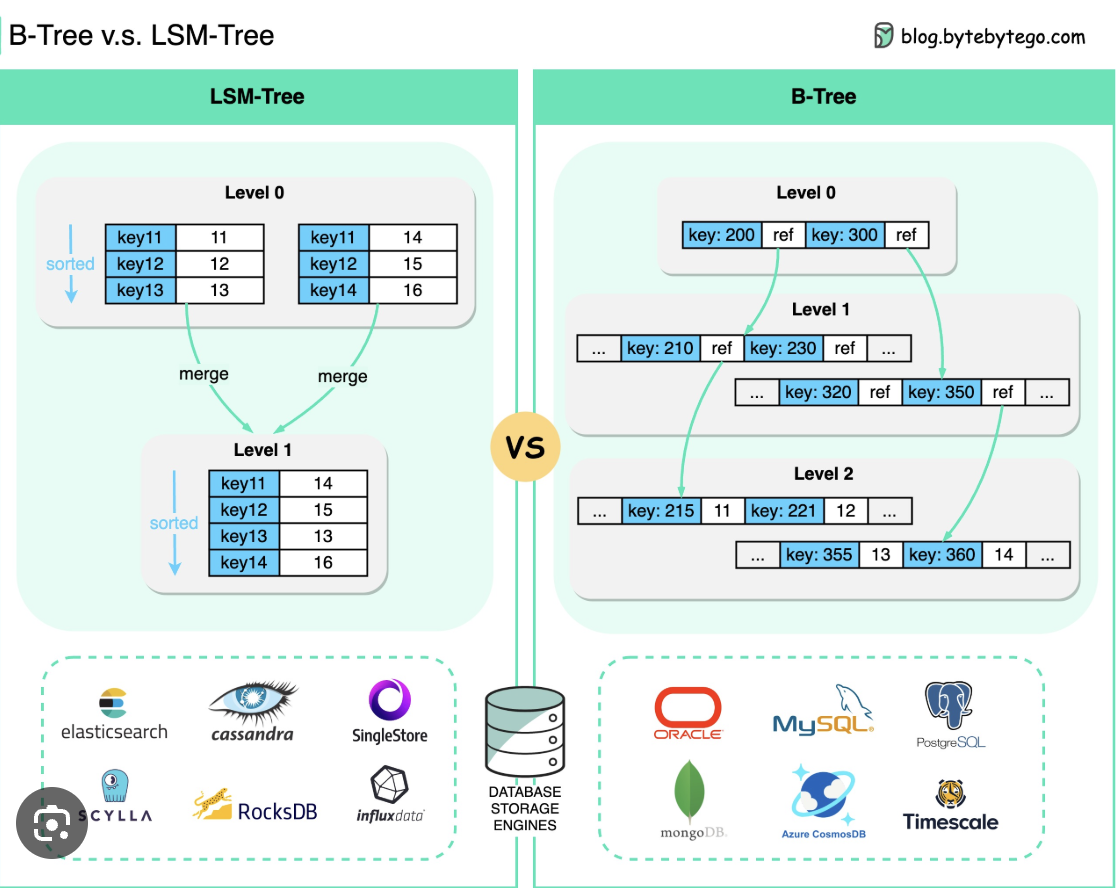
- B-Trees:
- Use for read heavy-workload
- Compare left and right in range.
-
LSM Tree
- Use for write heavy-workload.
- Trade off with write
- Hash Indexes
- Use for query = value.
d. Geospatial Indexes
-
Use quad tree and R-tree to query lat, long distance.
e. Inverted Indexes
-
Use for search documents like Elastic Search
f. Composite index (SQL)
- Index (user_id, created_at), sort by user_id first, filter by created_at later.
- Covering index (SQL): use to query all data in index without database.
- Use for write-heavy workload ⇒ Because it do not need to read the table, every data can be found in the index.
- For example, (user_id, status, id) is a composite index because it has 3 columns. It becomes a covering index only when a query uses only these columns so MySQL doesn’t need to read the table.
g. Add new index ⇒ Lock write in table, do not lock read.
- B-Trees:
Caching (Read-heavy, Faster, reduce load to DB, Cache failed, Cache Invalidate, Cache Thunderherd when expiring hot key)
- Problems to used cache
- Identify the bottlenecks
- Read-heavy
- Faster
- Reduce load to DB
- Decide what to cache
- Decide cache strategy
- Write-through makes sense when you need strong consistency, cons: high-load in write (can not use in heavy-write updates).
- Write-behind works for high-volume writes where you can tolerate some risk
- Questions
- Cache invalidation: How do you keep cached data fresh? Do you invalidate on writes, rely on TTL, or accept eventual consistency?
- Answer: When a user updates their profile, we’ll delete the cache entry so the next read fetches fresh data from the database.”
- Cache failures: What happens if Redis goes down? Will your database get crushed by the sudden traffic spike? ⇒ Circuit breaker in database and memcache.
- Answer: If Redis is unavailable, requests will fall back to the database. We’ll add circuit breakers so we don’t overwhelm the database with a stampede.
- We might also consider keeping a small in-process cache as a last-resort layer.
- Thundering herd: What happens when a popular cache entry expires and 1000 requests try to refetch it simultaneously?
- For extremely popular keys, we can use probabilistic early expiration or request coalescing so only one request fetches from the database while others wait for that result.
- Warm up before invalidate, or lock until 1 request update cache.
- Cache invalidation: How do you keep cached data fresh? Do you invalidate on writes, rely on TTL, or accept eventual consistency?
- Identify the bottlenecks
- Where to cache ?
- Redis: Distributed caching
- CDN
- Client-side caching: local storage, on-device storage.
- Memcaching.
- Caching strategy
- Cache aside
- Cons: stale data
- Write-Through Caching
- Cons: Write cache success, write db failed ⇒ Cause inconsistent between 2 layers.
- Write-Behind (Write-Back) Caching
- Cons: Redis downtime, can loss data.
- Read-through
- Same cache aside.
- But CDC from Redis to DB, write Redis later.
- Cache aside
- Manage cache size
- LRU
- LFU
- FIFO
- TTL
- Cache Stampede (Thundering Herd)
- A problem that when cache TTL, and multiple requests hit to the database at the same time.
- How to handle it:
- Request coalescing (single flight): Allow only one request to rebuild the cache while others wait for the result ⇒ Lock other processes to wait after the first request build cache successfully.
- Cache warming: Warm up cache before TTL.
- Cache Consistency
- Cache invalidation on writes
- Short TTLs for stale tolerance:
- Accept eventual consistency
- Hot Keys
- Replica keys in nodes.
- Memcache hot keys.
- Apply rate limiting
Sharding (Distributed Traffic, Data into DB - Shard Key + Sharding strategies + Pros/Cons - Hotspots + Multiple shards query + Inconsistency) - MongoDB is sharding + BTree in each shards
- Add new index
- Lock write command in table, do not lock read.
- Partition and Sharding
- Partition in the same machine.
- Sharding data is cross into multiple nodes.
- Sharding
- Horizontal Sharding
- Split by rows: 0 → 999, 1000 - 1999, 2000 - 2999 records
- Vertical Sharding
- Split by columns: (order_id, inventory_id), (order_id, transaction_id).
- Use it to split domain in OLAP: Inventory Domain, Payment Domain,… only care about the column that they need.
- Horizontal Sharding
- Choosing Your Shard like Index Key
- High cardinality: do not used only Male/Female.
- Aware hotspot problems
- All the query data should be in 1 shard, but not multiple shard.
-
Reason to choose shards
Some good shard keys would be:
- 🟢 user_id for user-centric app: High cardinality (millions of users), even distribution, and most queries are scoped to a single user anyway (“show me this user’s data”). Perfect fit.
- 🟢 order_id for an e-commerce orders table: High cardinality (millions of orders), queries are usually scoped to a specific order (“get order details”, “update order status”), and orders distribute evenly over time.
Whereas bad ones could be:
- 🔴 is_premium (boolean): Only two possible values means only two shards. One shard gets all premium users, the other gets free users. If most users are free, that shard is overloaded.
- 🔴 created_at for a growing table: All new writes go to the most recent shard. That shard becomes a hot spot for writes while older shards handle almost no traffic.
- Sharding Strategies
- Range-Based Sharding
- Use when you want query by range
Shard 1 → User IDs 1–1M Shard 2 → User IDs 1M–2M Shard 3 → User IDs 2M–3M - Think of a SaaS application where each client has a range of user IDs. Company A’s users only query Company A’s range, and Company B’s users only query Company B’s range. This distributes the load across shards.
- Pros:
- Do not shard in increasing like: ID auto increment, created_at
- Only used in range querying.
- Cons:
- If you query do not in SHARD KEY, it will query across the shards ⇒ like query users status = ‘active’.
- If you do not align the id well, re-sharding is very difficult.
- Use when you want query by range
- Hash-Based Sharding (need to learn consistent hashing)
- Cons:
- Can cause hotspot problems.
- Cons:
- Directory-Based Sharding
- Pros:
- Can control the key of user_id and value ⇒ balance the hotspot.
- Cons:
- Need to store and lookup a map when hashing.
- Pros:
- Range-Based Sharding
-
Consistent Hashing (Use for Sharding)
-
Traditional problem
- Currently, we have only 3 databases.
Event #1234 → hash(1234) % 3 = 1 → Database 1 Event #5678 → hash(5678) % 3 = 0 → Database 0 Event #9012 → hash(9012) % 3 = 2 → Database 2- Then we add a database to cluster and become 4 databases
database_id = hash(event_id) % 4;⇒ You need to redistributed all the shards.
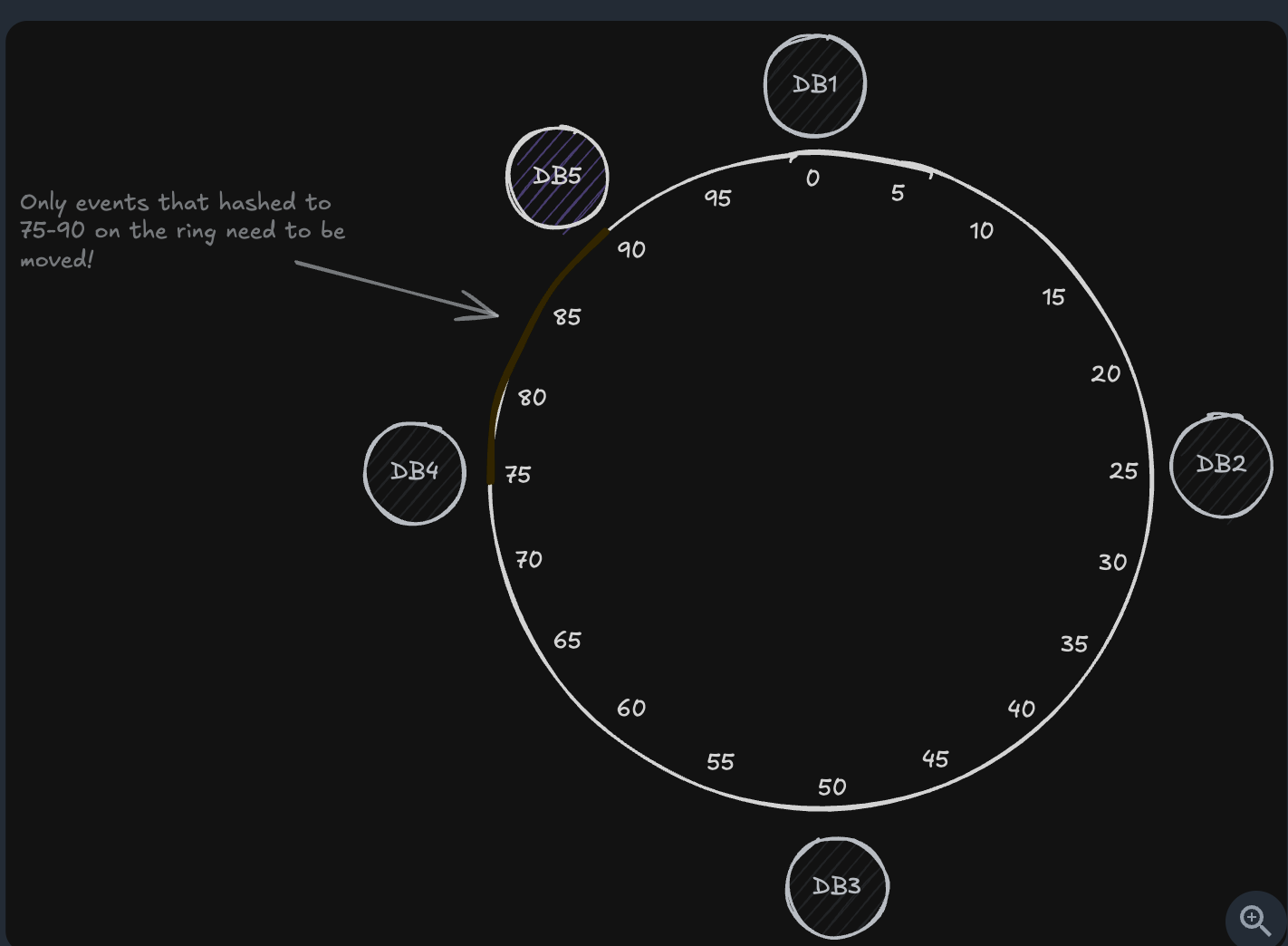
b. Consistent Hashing
- Whereas before almost all data needed to be redistributed, with consistent hashing, we’re only moving about 30% of the events that were on DB1, or roughly 15% of all our events.
- We see consistent hashing used in many heavily relied on, scaled, systems. For example:
- Apache Cassandra: Uses consistent hashing to distribute data across the ring
- Amazon’s DynamoDB: Uses consistent hashing under the hood
- Content Delivery Networks (CDNs): Use consistent hashing to determine which edge server should cache specific content
- Challenges of Sharding
- Hotspot problem
- Query in multiple shards
- Need to maintain consistency in distrbuted database - 2PC
-
Sharding in modern databases
- MongoDB
- Pros:
- Strong for range query
- Cons:
- Hotspot when used created_at or id auto increment when created.
- Pros:
- Cassandra
- Pros:
- Consistent Hashing is used for optimize resharding when create/remove nodes
- Cons
- Do not optimized when query range query, due to hash its items.
- Pros:
-
DynamoDB
If a partition becomes too:
- large (data size > 10GB), OR
- hot (too many reads/writes)
Partition A (hot or large)
→ split into
Partition A1 + Partition A2
If traffic or data decrease, DynamoDB may merge cold partitions back together:
Partition B1 + Partition B2 → Partition B
d. Comparison
- DynamoDB wins when you need: zero DevOps, DynamoDB is the winner.
- MongoDB: auto sharded by range ⇒ hotspot when created.
- Cassandra: Do not automatically shards, need operation experts.
- Used this to handle the single pointer of failure in database.
- MongoDB
-
CAP Theory, Leader-Followers and Gossip Leaderless
- CAP Therory
- P: Parititon Tolerant must be achieved ⇒ Because distributed system must be fault tolerant + And network must be unreliable ⇒ We can not do anything to prevent the network issues: bad weather, physical router,… in real world
- Consistency: allow data must be latest across all the nodes.
- Availability: some data is in stale nodes
- Choose C when transaction and consistency must be achieved, choose A in view data but not POST data.
-
Leader-Followers and the database use it
-
Paxos (Chúng sinh bình đẳng - Ring nodes Cassandra)
- Idea: Vote for the highest n above nodes. Any proposer with a higher ballot number can act as the leader.
- 2 Proposers propose (N, value), highest number between node.
- All Approvers vote only accept the value ≥ current N.
- Failed only when ALL the highest number nodes failed ⇒ Other nodes do not know the latest update number.
- Learners make decision based on majority votes
- Sample databases: Cassandra
⇒ Data always latest based on largest N.
-
RAFT (Master-followers mode)
- Leader is the best.
- Idea: same merge requests.
- Each followers compare changes with master ⇒ Old commit stale data and must be updated it.
- Sample databases: MySQL, PostgresSQL, Redis.
⇒ Data in leader come first and always latest.
- Asynchronous syncing
- Redis and MySQL is suffering from this.
- Paxos and RAFT do not work for asynchronus processing.
- Pros-cons of Leader-followers
- Only can write to 1 leader.
- Can not used in heavy-write system.
-
-
Leaderless and the database use it
- Pros: Can write-heavy with multiple nodes.
-
Gossip: Node A random talk to node B, and if node B have data latest than node A ⇒ Update node A
-
Vector clock
Write A: [1,0,0] Write B: [1,1,0] → B happened after A Write C: [1,0,1] → concurrent with B- Use this to understand the topology sort about actions
- Update between node.
- Last write win (timestamp-based, but each nodes can different timezone, fix khi write)
- value1 @ 100
- value2 @ 105 → keeps this
- Read repair (giống Last writei win, nhưng fix khi read)
- Read from multiple replicas (QUORUM or ALL)
- Compare versions
- If a replica is stale → push newest version to it
- CRDT merging
- A complex data structure.
- Safe-merge changes
-
- Different Levels of Consistency
- Strong consistency:
- All reads reflect the most recent write.
- Causal Consistency: sự nhất quán nhân quả
- If event A → event B, event A must be before event B.
- Read-your-own-writes Consistency
- Route the read request of current node to master first ⇒ So it always read the latest data after write.
- Improve UI/UX
- Eventual Consistency
- Allow async syncing between nodes
- Strong consistency:
Chance Data Capture
- Using the cron job but do not anything happened naturally:
- When update the bin log database, it trigger event producer.
- Cronjob consume the bin log ⇒ Update database.
- Use case: To update train model real-time in recommendation system, personalize data in real-time.
Making decisions
- When to shard cache ?
- Latency
- Reads: < 1ms within the same region
- Writes: 1-2ms average cross-region for optimized systems
- Throughput
- Reads: Over 100k requests/second per instance for in-memory caches.
- Writes: Sustained throughput of 100k requests/s.
- When to shard
- Peak throughput
- Low latency > 1ms.
- Data size: mem is not the problem, up to 1 TB.
- Latency
- When to shard database ?
- Storage: Single instances handle up to 64 TiB (terabytes) for most database engines, with Aurora supporting up to 128 TiB in some configurations
- Latency
- Reads: 1-5ms for cached data, 5-30ms for disk (optimized configurations for RDS and Aurora)
- Writes: 5-15ms for commit latency (for single-node, high-performance setups)
- Throughput
- Reads: Up to 50k TPS in single-node configurations on Aurora and RDS
- Writes: 10-20k TPS in single-node configurations on Aurora and RDS
- Write » Read in latency
- Connections: 5-20k concurrent connections, depending on database and instance type
- When to shard
- Data size
- Write throughput > 10k rps
- Read latency > 5ms
- Geographic Distribution
- When to shard servers
- Connections: 100k+ concurrent connections per instance for optimized configurations
- CPU: 8-64 cores
- Memory: 64-512GB standard, up to 2TB available for high-memory instances
- Network: Up to 25 Gbps bandwidth in modern server configurations
- When to shard ?
- CPU > 70%
- Memory > 80%
- Network bandwidth
- When to shard message queue
- Throughput: Up to 1M messages /second per broker in modern configurations
- Latency: 1-5ms end-to-end within a region for optimized setups
- Message Size: 1KB-10MB efficiently handled
- Storage: Up to 50TB per broker in advanced configurations
- Retention: Weeks to months of data, depending on disk capacity and configuration
- When to shard ?
- High throughput > 1M messages/second
- Common mistakes in sharding
- Premature sharding:
- 400 GB còn chưa shard nói gì 100GB.
- Over-estimate the latency:
- Cache > 1 ms
- Query db > 5-10ms
- Do it nearly need Redis here ? The problem is about connection pool.
- Over engineering about high-throughput
- 10k wps (write per seconds) can directly go to the database.
- Message queue when 50k+ wps
- Before think to message queue: Batch processing, manage connection pool in the server.
- Premature sharding:
API Gateway và Load Balancer
- API Gateway và Load Balancer thứ tự trước sau
- Client → LB 4 → (API Gateway 1, API Gateway 2) → LB7 (hoặc LB4) → (Service 1, Service 2)
- Can use client-side load balancing to prevent bottleneck in LB4.
Elastic Search
- Component nodes
- Ingestive Node: chunking the documents by algorithm: word_by_word, lowercase, two_grams
- Data nodes: store sharding of documents of a index
- Coordinator node: query and merge relevant data in nodes.
- Pros and Cons
- Pros:
- Allow full-text search for read-heavy system.
- Cons:
- Do not suitable for write-heavy system.
- Pros:
When to use Infrastructure
- Elastic Search
- When you want full-text search
- Allow to eventually consistency
- Kafka
- Asynchronous processing
- Ensure message in order: fire in the same paritition.
- Decouple 1 service into consumer and producer ⇒ by split it into producers and consumers and scale independently.
- Producer
- ACK = 0: fire and forget
- ACK = 1: only when the first partition receive messages, do not wait for this sync to all the partitions.
- ACK = N: wait until it sync message to all partitions.
- Using ProducerID + sequence number ⇒ So that when the producer send duplicate message to Kafka but old sequenc, Kafka can reject to receive it.
- Consumer
- Idea: consume message by pull-based model
- In consumer group,
- 1 Partition responsible by 1 consumer.
- if 1 consumer downtime (can not health check) → Parition to assign to another consumer.
- If you have 8 partitions, 3 consumers
C1 → P0, P1, P2, P3 C3 → P4, P5, P6, P7 - If you have 8 consumers, 3 paritions
C1 -> P1 C2 -> P2 C3 -> P3 - If you have 1 consumer, 3 paritions
C1 -> P1, P2, P3 - At most once
- Commit when receive message
- Can be processed failed.
- At least once
- Commit after process message.
- Can be duplicate
- Notes: Thường xử lý theo hướng process xong mới commit ⇒ Thêm 1 transaction id hoặc message id trong database, trong trường hợp duplicate thì ignore.s
- Consumer: commit and process message.
- Redis
- Redis caching.
- Distributed Lock
- Redis pub/sub
- Redis leaderboard
- Redis streaming
- Redis counter, rate limiting.
- When to Propose an API Gateway (Microservices, not Client-Server)
- When you have multiple services and need API gateway.
- Consolidate the routing, rate limiting middlewares logic in the same place.
- Without one, clients would need to know about and communicate with multiple services directly ⇒ Depend to change the server IP when changed.
- Cassandra
- Query: using gossip protocol, because each node know where data using hash key and communicate with each others ⇒ Client → Coordinator → Gossip to the right node.
- Storage: LSM Tree to store log ⇒ High write-throughput.
- Gossip protocol
- Because after hash the key to number, e.g. 75 ⇒ It know exactly what the data in the node in range [70, 75]
- Coordinator
- Because client do not know what the algorithm or changed of data partition in Cassandra.
- Make request to coordinator and it route and merge data (if you query list).
- MySQL
- Use when need strong consistency and ACID, lock
- Think about isolation level
- Read optimization:
- Using index with logN
- For WHERE, SORT
- Write performance:
- Write data in disk
- Write index
- Write to Write-ahead log
- DynamoDB
- Think about: partition key + sort key
- Example:
{
  "PartitionKey": "user_id",
  "SortKey": "created_at"
}
| user_id | created_at | activity | metadata | | ——- | —————- | ——— | ——– | | 123 | 2025-02-10T10:00 | login | … | | 123 | 2025-02-10T10:05 | view_item | … | | 123 | 2025-02-10T10:08 | purchase | … |
- Zookeeper
- Use for store private environment variables.
- Use for service discovery
- Use for Leader Election ⇒ Consensus algorithm in leader-followers
System Design Problems
Real-time updates (short polling, long polling, websocket, SSE, WebRTC, Pubsub)
1. Simple Polling (do not need real-time)
- Definition
- Interval polling to the system each 5 - 10ms.
- Pros
- Simple to implement without infrastructure
- Cons
- High bandwidth server
- When to use
- System that only required near real-time, do not force real-time updates.
2. Long Polling (same websocket, used in WS and SSE in block in some browsers)
- Definition
- Server hold connection until receive message.
- Browser: 5 mins
- Postman: 30s.
- curl: unlimited
- Server hold connection until receive message.
- Pros
- Low latency (almost real-time)
- Fewer requests than short polling
- Cons
- Overhead the server.
- When to use
- You need near real-time events
- WebSockets or SSE are blocked (corporate firewalls)
3. SSE (Server-client)
- Definition
- Event built from browser so that server push message to client when needed.
- Pros
- SSE push to client real-time
- Do not need to polling
- Cons
- Limited browser support
- When to use
- Streaming API like chatGPT.
4. Websocket (Bi-direction, long poolling is server-client, but 1 client A connect to 1 server B using address)
- Definition
- Keep the bi-directional connect from client and server
- Pros
- Server and client can communicate in real-time
- Cons
- Client → LB → Server A
- All messages must always go to Server A, not B or C.
- When to use
- Real-time application through server.
- Chat needs bidirectional, interactive communication
- Why we can not use SSE replace websocket
- SSE can not using:
- typing → “Bob is typing…”
- read receipts → “Seen at 10:40”
- presence → “Alice is online”
- call signaling → “Ringing”
- WebRTC handshake messages
- SSE can not using:
5. WebRTC (used for P2P)
- Definition
- Pros
- Cons
- When to use
- If you want to chat P2P, without using server
6. Pubsub (1 server - N clients)
- 1 server → N clients.
7. Handle Failures
- “How do you handle connection failures and reconnection?”
- Health check the connection to reconnect
- Store last messages (sequence number) in streams or Kafka.
- “What happens when a single user has millions of followers who all need the same update?”
- Using pull model instead of model for celebrity.
-
How do you maintain message ordering across distributed servers?
- Vector clocks or logical timestamps help establish ordering relationships between messages.
msg1: VC=[A:1, B:0]

msg2: VC=[A:1, B:1]

VC1 < VC2 IF
    For all i: VC1[i] ≤ VC2[i]
AND
    At least one index strictly <
Scale reads (Problem about latency, Database, Sharding, Redis, CDN)
- Optimize in database
- Add index
- Denormalize database
- Update RAM and disk
- Sharding database
- Read replicas: balance load traffic
- Sharding: resize database size.
- Using cache Redis + CDN.
- Using caching
- Using CDN
- Using memcache or local device
- When to use index, when to use shard
- INDEX solves latency.
- SHARDING solves storage (geo-graphic system).
-
Problems
- What happens when your queries start taking longer as your dataset grows ?
- Add index
-
How do you handle millions of concurrent reads for the same cached data?
- Solution 1: Memcache
- Solution 2: Request coalesce
(1,000,000 requests) ↓ Coalesce (merge) ↓ Send only 1 request to DB ↓ Store result in cache ↓ Return same result to all 1,000,000 requests - Solution 3: Sharding keys across the Redis: feed:taylor-swift:1, feed:taylor-swift:2
c. What happens when multiple requests try to rebuild an expired cache entry simultaneously? (Thunderherd problem)
- Solution 1: Request coalesce: only the first requests updated cache, other waits.
- Solution 2: Warm up cache before expiration. Check TTL on each read → If TTL is low, refresh in background
d. How do you handle cache invalidation when data updates need to be immediately visible?
- Because eventually consistency, some requests go to old nodes.
- Cache versioning: event:123:v42, event:123:v43 solve the problems.
e. How to solve big key in Redis ?
- Split it into multiple subkeys.
- Instead of saving “all items under 1 key”, use Stream to store data record-by-record
- What happens when your queries start taking longer as your dataset grows ?
Scale writes (Problem about storage, Sharding, Queue, Server Pre-processing)
- Database choices
- Using Cassandra for heavy-write
- Based on LSM Tree.
- Sharding
- Horizontal Sharding
- Shard by user-id key is good, shard by region-id is bad.
- Vertical sharding
- Shard tables by demand.
- Core post content (write-once, read-many) ⇒ B-tree indexes
- Engagement metrics (high-frequency writes) ⇒ High-frequency updates
- Analytics data (append-only, time-series) **⇒ Time-series database
- Horizontal Sharding
- Write Queues for Burst Handling
- Store in queue to handle throughput.
- Worker consume message and batch processing later.
- Load Shedding Strategies
- Reject some frequently data when needed.
- For example, user ping location to location database in database.
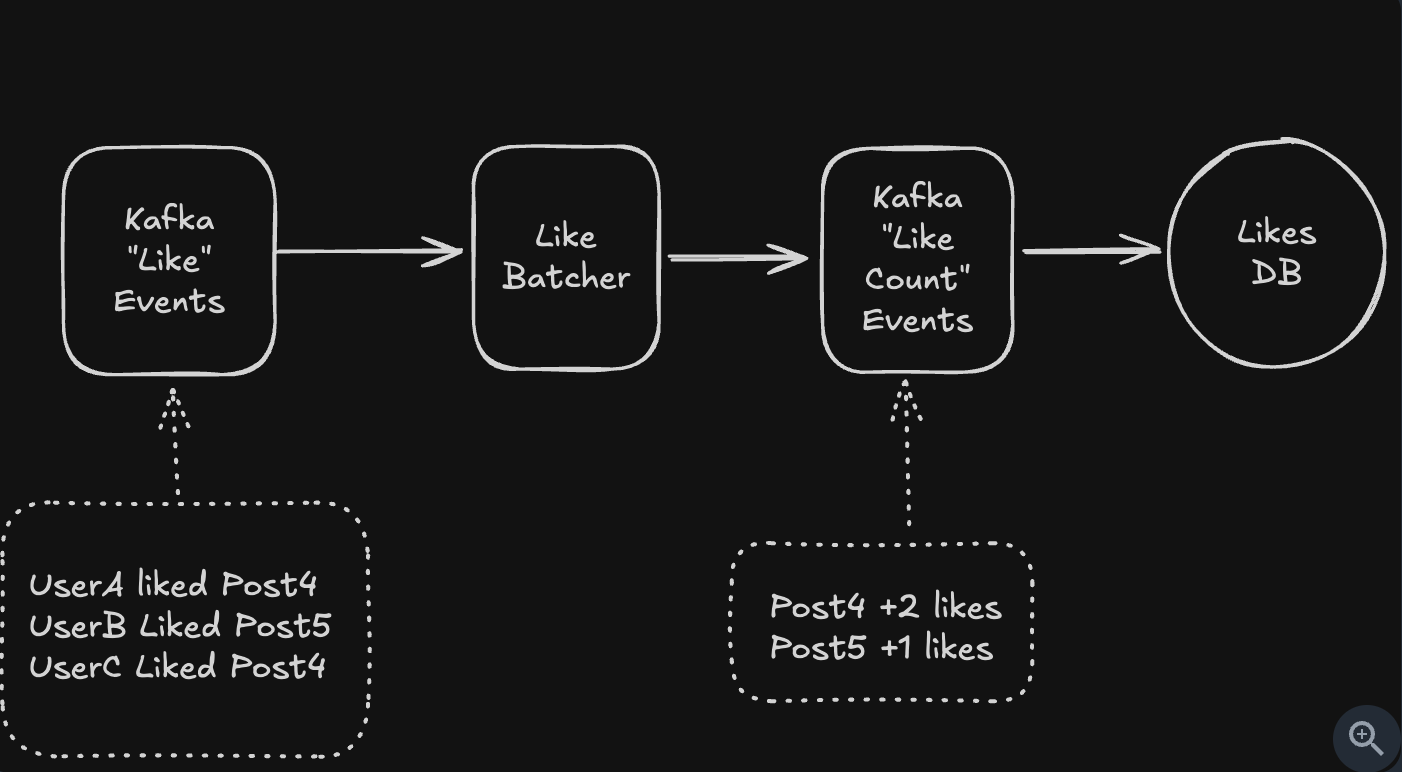
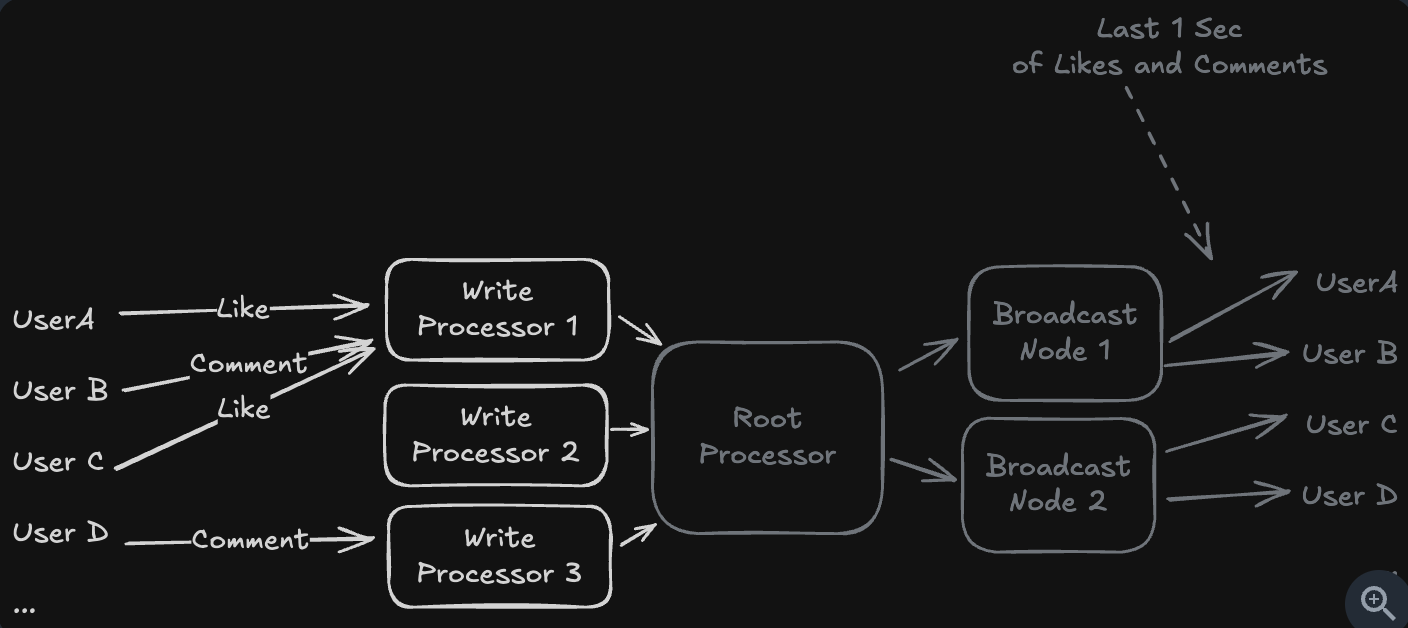
- Intermediate Processing
- Preprocessing in backend, before insert database
- Preprocessing in backend, before insert database
- Hierarchical Aggregation
- Use the broadcast nodes to solve the problem
- Idea:
- Users only receive data through a shared broadcast channel.
- We do not store each likes for user ⇒ We store in channel.
- Use in livestream solution.
- How to check a user like a video
- Use SET or BITMAP in Redis
- Store directly in Redis and database.
50,000 events/sec × 100,000 viewers
= 5,000,000,000 fanout writes per second
- Problems
- How do you handle resharding when you need to add more shards?
- Solution 1: The naive approach is to take the system offline, rehash all data, and move it to new shards. But this creates hours of downtime for large datasets.
- Solution 2: Production systems use gradual migration which targets writes to both locations (e.g. the shard we’re migrating from and the shard we’re migrating to)
- What happens when you have a hot key that’s too popular for even a single shard?
- For the post1Likes key, we can have post1Likes-0, post1Likes-1, post1Likes-2, all the way through to post1Likes-k-1.
- Aggegrate all shards when count total likes for a post.
- How do you handle resharding when you need to add more shards?
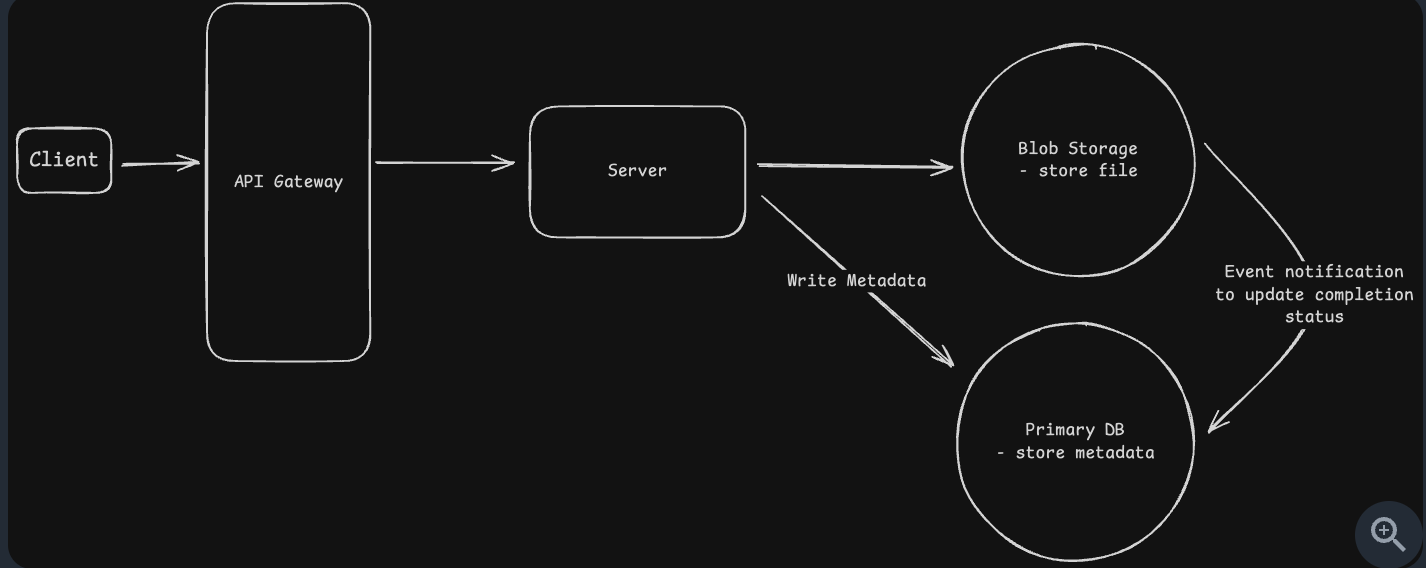
Upload large file (Multiple Chunks)
- Simple direct upload
- Simple direct download
-
Split multiple chunk when upload, store metadata in database
{ "upload_id": "abc123", "file_name": "video.mp4", "file_size": 524288000, "chunk_size": 5242880, "total_chunks": 100, "uploaded_chunks": [0,1,2,3,4,6,7,10], "status": "in_progress", "updated_at": 1731679643 } - State Synchronization Challenges
- Network failures: Upload success but webhook to database failed.
- Orphaned files: the client crash before notifying you.
- Malicious clients: Users could mark uploads as complete without actually uploading anything
-
Problems
- What if the upload fails at 99%?
- Keep only upload the current chunk.
- How do you prevent abuse
- Don’t let users immediately access what they upload.
- Implement a processing pipeline where uploads go into a quarantine bucket.
-
How do you handle metadata?
-
You can use bitmap to check the chunk_id
SETBIT upload:abc123:bitmap 5 1

GETBIT upload:abc123:bitmap 5

for i in 0..total_chunks-1:
    if GETBIT(...) == 0:
        missing.append(i)
-
- How do you ensure downloads are fast?
- Using CDN in nearest geography.
- Apply range download
GET /large-file.zip
Range: bytes=0-10485759  (first 10MB)
- What if the upload fails at 99%?
High contention (Single Database, Multiple Databases)
- Single database (Pessimistic Locking in high-contention, Optimistic locking in low-contention)
- ACID:
- Atomic in transaction
- Pessimistic Locking
- Lock the row first, update later
- Using: SELECT for UPDATE ⇒ it will lock the rows.
- When to use: Use in high-contention system, lock to prevent updated failed
- Transaction isolation
- 4 types: READ UNCOMMITTED, READ COMMITTED, REPEATABLE READ, SERIALIZATION
- Problems: dirty read, non-repeatable read, phantom read.
- READ UNCOMMITTED: have all problems
- READ COMMITTED: solves dirty-read
- REPEATABLE READ: solve the non-repeatable read, in the same transaction, for example calculate new_price from old_price ⇒ make sure 2 time read is the same.
- SERIALIZATION: solve phantom read, same SELECT but finds new rows have been inserted or existing rows have been removed by another, concurrent transaction
- Optimistic locking
- Using version = version + 1 when update.
- Retry with version + 1
- In group ordering feature, limited as much as the modify of 1 member to another members ⇒ Worst case: last write win.
- When to use: Low-contention system, where we can retry some times.
- ACID:
- Multiple databases (2PC when strong consistency, Saga in eventually consistency, distributed lock for user behaviours)
- 2PC:
- Prepared all + lock + commit
- Pros: Consistency
- Cons: bottleneck at coordinator
- SAGA
- Each node commit transaction per steps.
- Rollback if failed ⇒ Eventually consistency, first show data success but else show failed ⇒ Confuse for UI/UX
- Distributed lock
- One node is writing, others must wait ⇒ Safe and do not display wrong data.
- 2PC:
-
Problems
- How do you prevent deadlocks with pessimistic locking?
- Keep the lock order: lock A first B
- Keep time to live for the lock.
- What if your coordinator service crashes during a distributed transaction?
- Master-slave for coordinator, allow downtime to propose new coordinator.
- Store logs for migrate
-
How do you handle the ABA problem with optimistic concurrency?
- Problem: A → B → A, although we see “A” but actually it have changed.
- The solution is using a column that you know will always change.
- Use version or some variable always changed
-- Use review count as the "version" since it always increases UPDATE restaurants SET avg_rating = 4.1, review_count = review_count + 1 WHERE restaurant_id = 'pizza_palace' AND review_count = 100; -- Expected current count - What about performance when everyone wants the same resource?
- Using queue for request coalesce
- How do you prevent deadlocks with pessimistic locking?
Multi-steps process (Workflow definition, Event sourcing, Single server)
- Single-server adapter
- Can cause bottleneck
- Event sourcing
- Using pub/sub as event-driven.
- Trigger logic when fire event ⇒ But need to if else operation code to handle exeception
- Workflow:
- The way to define and manage event sourcing
- If success, do sth, otherwise handle exception A, B, C,…
- Problems
- How will you handle updates to the workflow?
- Workflow versioning
- Workflow migration.
- How do we keep the workflow state size in check ?
- When workflow crashed, need to restore the latest state of the workflow.
- How do we deal with external events?
- Your workflow needs to wait for a customer to sign documents. They might take 5 minutes or 5 days. How do you handle this efficiently?
- Use signal for workflow for external events, paused, no polling for this ⇒ resume when receive external input.
- How can we ensure X step runs exactly once?
- Make the event idempotent, add idemtipocy for event by client-key.
- Or make the event with same input ⇒ same output.
- How will you handle updates to the workflow?
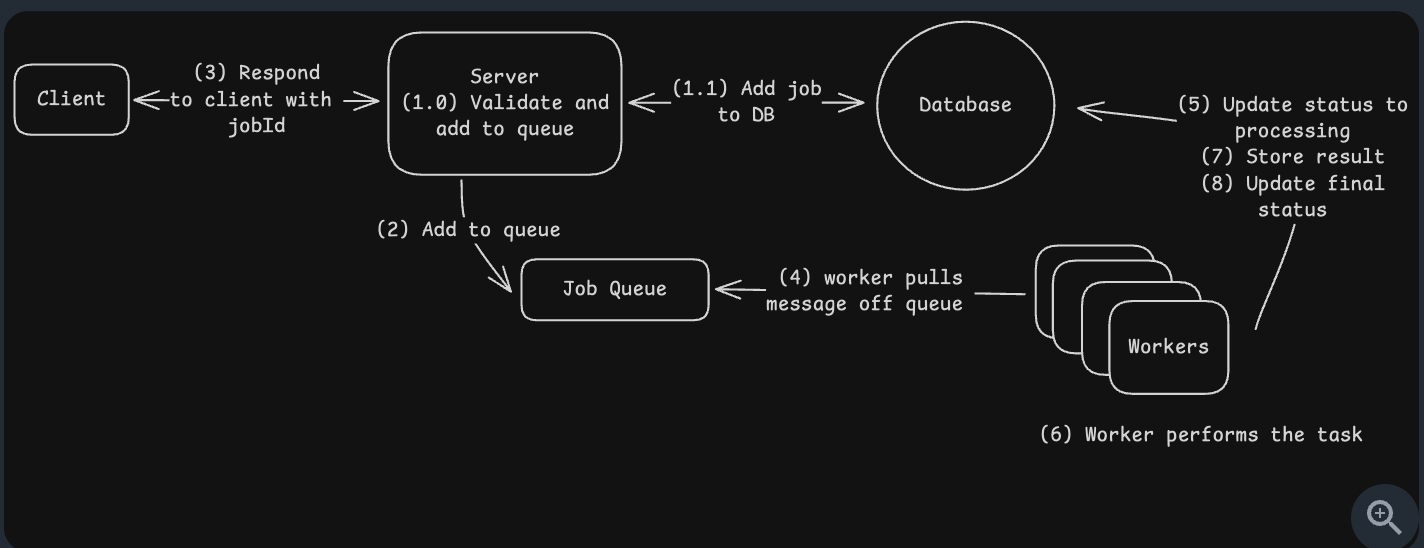
Job Scheduler (Jobs, Workers, Queue, Database)
- Message Queue
- Worker
- Database (used to track status event)
- Problems
- Worker crash: What happens if the worker crashes while working the job?
- Typically, you’ll have a heartbeat mechanism that periodically checks in with the queue to let it know that the worker is still alive
- The job will be retried by another worker.
- Timeout: For example, in SQS, you can set a visibility timeout. In RabbitMQ, you can set a heartbeat interval
- Failed jobs: What happens if a job keeps failing? Maybe there’s a bug in your code or bad input data that crashes the worker every time.
- Using dead letter queue.
- Duplicate jobs: A user gets impatient and clicks ‘Generate Report’ three times. Now you have three identical jobs in the queue. How do you prevent doing the same work multiple times?
- Using idemtipocy key
- Idemtipocy key: depend to client
- If client want to make 3 different actions, they send 3 idemtipocy key.
- If client send 1 idemtipocy key for 3 requests ⇒ Treat 3 requests as 1.
- Peak jobs: It’s Black Friday and suddenly you’re getting 10x more jobs than usual. Your workers can’t keep up. The queue grows to millions of pending jobs. What do you do?
- Backpressure: It slows down job acceptance when workers are overwhelmed.
- You can set queue depth limits and reject new jobs when the queue is too deep and return a “system busy” response immediately rather than accepting work you can’t handle.
- Long jobs: Some of your PDF reports take 5 seconds, but end-of-year reports take 5 hours. They’re all in the same queue. What problems does this cause?
- Solution: seperate jobs into “fast queue” and “low queue”
- Order jobs: What if generating a report requires three steps: fetch data, generate PDF, then email it. How do you handle jobs that depend on other jobs?
- Apply workflow pattern
- Each job have: previous_steps and retry when failure
- Worker crash: What happens if the worker crashes while working the job?